
As an Amazon Associate, I earn from qualifying purchases.
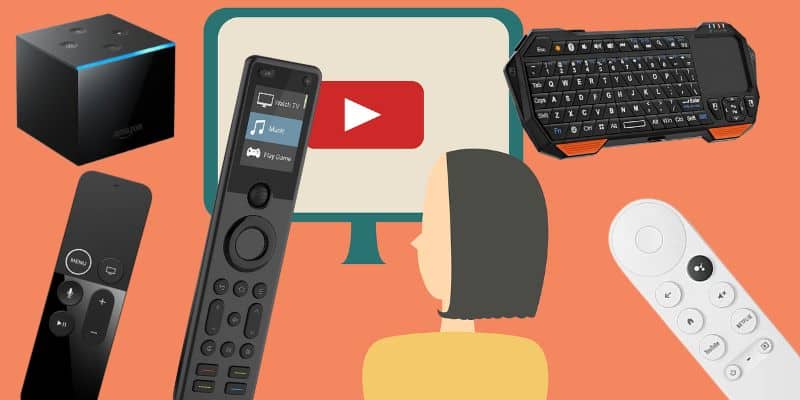
Here are my top picks for the best remotes for YouTube TV you can buy right now.
Hello YouTube TV
 Ok, this was a tough one. I am not gonna lie.
YouTube TV is one app, but it lives everywhere. It runs on Roku, Apple TV, Fire TV, Chromecast, Xbox, and half the smart TVs in your house. I own or have tested most of the remotes in this roundup myself, including the SofaBaton X1S, Fire TV Cube, Function101, and now the X2.
Here is the punchline. The best remote isn’t always the fanciest one. It is the one that fits the box, TV, or console you actually use to open YouTube TV.
Fortune Business Insights flags the shift toward smart, multi-device remotes over single-purpose replacements. That is exactly the tension in this post. Some folks need one hub to run the whole room. Others just need a better clicker for one platform. Both camps are right.
Key Takeaways
- SofaBaton X2 is the move when YouTube TV is part of a bigger home-theater setup.
- SofaBaton X1S keeps the hub idea, drops the touchscreen, and drops the price.
- Roku, Chromecast, Function101, Fire TV Cube, and PDP make sense when one streaming platform runs the room.
Best Remotes for YouTube TV Comparison Table
Here is how the top remote options line up side by side.
| Premium Hub | Mid-Tier Hub | Roku Upgrade | Google TV Replacement | Apple TV Buttons | |
|---|---|---|---|---|---|

|

|

|

|

|
|
| SofaBaton X2 | SofaBaton X1S | Roku Voice Remote Pro | Chromecast Voice Remote | Function101 Bluetooth | |
| Type | Hub remote with touchscreen | Hub remote with OLED | Official Roku replacement | Google TV replacement | Apple TV Bluetooth remote |
| Best Fit | Full-room control | Premium control for less | Roku players and TVs | Chromecast with Google TV | Apple TV users |
| Voice / Smart Home | Alexa, Google, Home Assistant | Alexa and Google Assistant | Roku voice | Google Assistant | None |
| Backlit Buttons | ✓ | ✓ | ✓ | ✗ | ✗ |
| Power | Rechargeable battery | Rechargeable battery | Rechargeable battery | Two AAA batteries | Two AAA batteries |
| Charging / Battery Notes | Dock included | USB-C charging | USB charging | Replaceable batteries | Replaceable batteries |
| Screen / Display | Color touchscreen | Small OLED | None | None | None |
| Controls Other Gear | ✓ | ✓ | Limited | Limited | Apple TV only |
| Lost Remote Finder | ✓ | ✓ | ✓ | ✗ | ✗ |
| Check Price | Check Price | Check Price | Check Price | Check Price |
#1 – SofaBaton X2: Premium Hub
At a Glance
- Compatibility: Streamer, TV, soundbar, receiver, smart home, and more.
- Power / Battery: Rechargeable remote with charging dock.
- Voice / Smart Home: Alexa, Google Assistant, and Home Assistant support.
- Screen / Display: Color touchscreen for activities and devices.
- Use Case: Best for a multi-device living room.
The SofaBaton X2 is my top pick if you want one premium hub to run the whole room. The remote itself feels like the most ambitious Harmony-style replacement SofaBaton has made, and it makes the most sense when the TV app is only one piece of a bigger home-theater setup. I like having the dock on the table because it turns one small annoyance, keeping the remote charged, into a non-issue.
SofaBaton sent me the X2 to test, and I am still putting it through its paces. So far, I am encouraged by the touchscreen, charging dock, and broader smart-home support, especially for anyone comparing the best remotes for YouTube TV against older universal remotes.
Pros
- Touchscreen makes activities easy to recognize.
- Charging dock keeps the remote ready.
- Hub controls IR, Bluetooth, RF, and Wi-Fi gear.
- Best fit for complex living-room setups.
Cons
- Premium price.
- Takes more setup than a streamer remote.
- Overkill for a single streaming box.
SofaBaton X2 lets you command your entire home entertainment system with an intuitive touchscreen remote.
Video Review
Here is my hands-on SofaBaton X2 unboxing from my TecTimmy channel. Click the “Watch on YouTube” link in the video if you prefer to watch this over there.
#2 – SofaBaton X1S: Mid-Tier Hub
At a Glance
- Compatibility: Streamer, TV, soundbar, receiver, and other AV gear.
- Power / Battery: Rechargeable via USB-C.
- Voice / Smart Home: Alexa and Google Assistant support.
- Screen / Display: Small OLED with scroll-wheel navigation.
- Use Case: Best for hub control below X2 pricing.
The SofaBaton X1S remains the practical middle ground if you want hub-based control without paying for the X2 touchscreen. Before moving to the X2, this was my go-to remote, and the X1S still makes a lot of sense for activity-based streaming rooms. I know its quirks too: setup can make you mutter, but once it settles in, it is a very capable daily driver.
It can turn on the TV, wake a soundbar, switch inputs, and open the right streamer with one activity. That makes it one of the best remotes for YouTube TV if your setup is more complicated than one box plugged straight into one TV.
Pros
- Strong hub control for the money.
- Backlit buttons improve nighttime use.
- Activity control reduces input-switching friction.
- Familiar layout for Harmony refugees.
Cons
- No touchscreen.
- Still requires app setup.
- Less polished than X2.
SofaBaton X1S offers similar core functionality to the X2, minus the touchscreen, at a lower price.
Video Review
Here is my exact setup order from my TecTimmy YouTube channel for getting the X1S running cleanly.
Video Credit: TecTimmy#3 – Roku Voice Remote Pro: Roku Upgrade
At a Glance
- Compatibility: Roku players, Roku TVs, and Roku Streambars.
- Power / Battery: Rechargeable via USB.
- Voice / Smart Home: Roku voice control.
- Screen / Display: No screen.
- Use Case: Best for Roku-first streaming rooms.
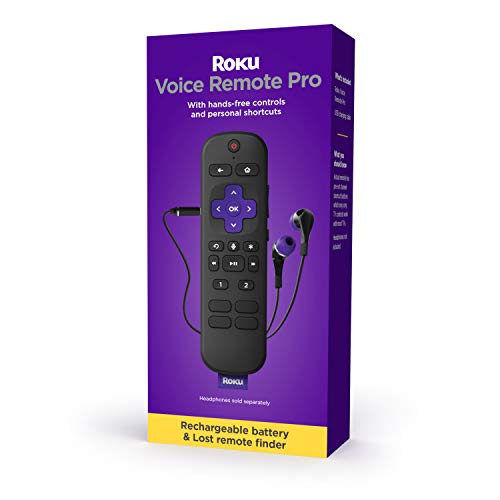
The Roku Voice Remote Pro is the cleanest upgrade if Roku is your main streaming platform. It keeps the Roku interface intact while adding the comfort features that make daily viewing easier. In my Roku testing for this site, the official Pro remote is the one that feels least like a compromise.
The rechargeable battery, lost-remote finder, private listening, and shortcut buttons make it one of the best remotes for YouTube TV for anyone already happy inside the Roku ecosystem. It will not consolidate the room like SofaBaton, but it is the right kind of boring for Roku.
Pros
- Official Roku compatibility.
- Rechargeable battery.
- Private listening through the remote.
- Lost-remote finder is genuinely useful.
Cons
- Roku ecosystem only.
- Does not replace a full universal remote.
- Private listening requires headphones.
#4 – Chromecast Remote: Google TV Replacement

At a Glance
- Compatibility: Chromecast with Google TV.
- Power / Battery: AAA batteries.
- Voice / Smart Home: Google Assistant support.
- Screen / Display: No screen.
- Use Case: Best simple replacement for Google TV users.
The Chromecast replacement remote is the simple answer for Google TV users who do not need a universal remote. It is the familiar route: directional pad, Assistant button, app buttons, and enough volume control to keep the couch experience simple.
I would not buy this to modernize an entire home theater. I would buy it when the Chromecast remote is lost, broken, or driving you nuts, and you want the YouTube TV app to feel normal again.
Pros
- Simple Google TV replacement.
- Voice search support.
- Familiar Chromecast-style layout.
- Low-friction option for one-device rooms.
Cons
- Not a universal remote.
- Limited usefulness outside Google TV.
- Only useful for Google TV.
#5 – Function101 Bluetooth: Apple TV Buttons
At a Glance
- Compatibility: Apple TV and Apple TV 4K.
- Power / Battery: AAA batteries.
- Voice / Smart Home: No Siri microphone.
- Screen / Display: No screen.
- Use Case: Best for Apple TV users who want real buttons.
The Function101 Bluetooth Button Remote replaces the Apple TV Siri Remote in this list because it is a better fit for people who want tactile buttons. I have tested the Function101 remote with Apple TV, and the traditional directional pad makes it feel more like a TV remote than a glassy touch controller.
For Apple TV users, this is one of the best remotes for YouTube TV if the priority is predictable channel surfing and playback control. It gives up Siri, but that tradeoff may be worth it if guests or family members struggle with Apple’s touch-heavy remote.
Pros
- Traditional buttons feel familiar.
- Directional pad is easier for many users.
- Good Apple TV replacement for guests.
- Straightforward playback controls.
Cons
- No Siri voice control.
- Apple TV only.
- No rechargeable battery.
Function101 is offering my readers special savings on this remote. Click Function101 below for the deal, or shop at Amazon if you prefer.
#6 – Fire TV Cube: Alexa Streamer
At a Glance
- Compatibility: Fire TV, TVs, soundbars, and compatible AV gear.
- Power / Battery: Powered streaming device with included remote.
- Voice / Smart Home: Hands-free Alexa.
- Screen / Display: No remote screen.
- Use Case: Best for voice-first Fire TV rooms.
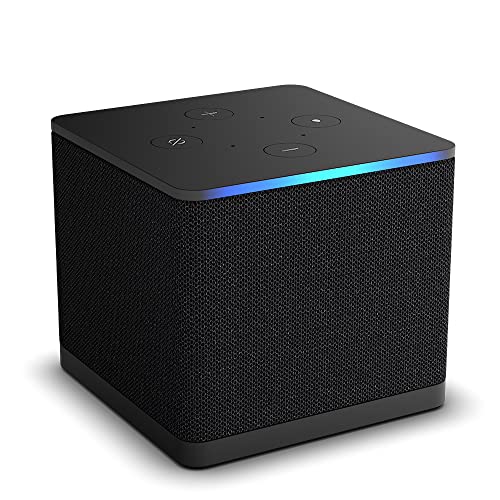
The Fire TV Cube is more streamer than remote, but it still earns a place here for Alexa-first setups. If you already like Fire TV, the Cube gives you hands-free voice control plus a physical remote for normal navigation.
It is not the right choice if you only need a replacement clicker. It is one of the better options when the room already leans Amazon and you want voice control for launching YouTube TV, changing volume, and controlling compatible gear.
Pros
- Hands-free Alexa control.
- Runs the app directly.
- Can control compatible TVs and soundbars.
- Strong option for Fire TV households.
Cons
- More streamer than remote.
- Best only inside the Fire TV ecosystem.
- Not a true universal remote.
The latest Fire TV Cube offers hands-free 4K streaming, Alexa voice control, and fast Wi-Fi 6E for smoother performance.
Video Review
Here is a video I published on my TecTimmy YouTube channel showing the Fire TV Cube unboxing.
Video Credit: TecTimmy#7 – PDP Gaming Remote: Xbox Media Control
At a Glance
- Compatibility: Xbox Series X, Xbox Series S, and Xbox One.
- Power / Battery: AAA batteries.
- Voice / Smart Home: None.
- Screen / Display: No screen.
- Use Case: Best for Xbox-based streaming rooms.
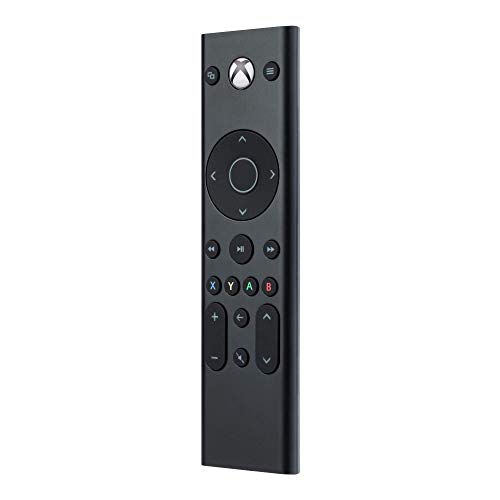
If you watch through an Xbox, the PDP Gaming Remote is the practical pick. It gives you dedicated media buttons instead of making every couch session run through a game controller.
The big win is comfort. A controller works, but it never feels like a living-room remote, and the PDP remote is one of the best remotes for YouTube TV for Xbox users who mainly need playback, volume, and menu navigation.
Pros
- Better than using an Xbox controller.
- Dedicated media controls.
- Good fit for Xbox-based viewing.
- Simple layout for streaming.
Cons
- Xbox only.
- No voice control.
- Not useful outside console streaming.
How I Tested These Remotes
I ranked these remotes around the device they actually control, not around a generic spec sheet.
- Hands-on time: I prioritized remotes I own, use, or have tested directly.
- Platform fit: Roku, Apple TV, Fire TV, Google TV, and Xbox all need different controls.
- Living-room friction: I favored remotes that reduce input switching, charging headaches, or awkward app navigation.
- Hub value: I only rewarded universal control when it actually simplifies a multi-device room.
FAQs
These best remotes for YouTube TV questions cover compatibility basics.
1. What devices work with YouTube TV?
YouTube TV works on Roku, Fire TV, Apple TV, Google TV, Chromecast, Xbox, smart TVs, phones, tablets, and browsers. The best remotes for YouTube TV control the device running the app, then add useful extras like volume, voice search, input switching, private listening, or full-room automation around that device from the couch for daily viewing.
2. Can I use a universal remote with YouTube TV?
Yes. A universal remote works when it controls the streaming box, TV, or console that opens the app. The best remotes for YouTube TV are strongest in rooms with a TV, soundbar, receiver, and streamer because they can trigger one activity instead of waking each device separately every night from the couch without extra fumbling.
3. What are the best remotes for YouTube TV on Roku?
Roku owners should start with Roku Voice Remote Pro because it keeps the native interface, voice search, private listening, rechargeable battery, and lost-remote finder together in one official controller. Universal hubs can still make sense when the Roku shares a larger theater rack, but simple Roku rooms benefit most from the official remote in practice.
4. Should Apple TV users buy Function101 or Siri Remote?
Function101 is the better fit for Apple TV owners who want tactile buttons, a traditional directional pad, and less swiping. Among the best remotes for YouTube TV, Siri Remote is still sleeker for voice-first users, but Function101 feels more familiar for channel surfing, playback control, and guests who dislike touch-heavy navigation during long viewing sessions.
5. Does voice control matter for YouTube TV?
Voice control helps with search, app launching, and hands-free playback commands, especially on Fire TV, Roku, and Google TV. It should not be the only deciding factor. The best remotes for YouTube TV still need comfortable buttons, reliable volume control, clear navigation, and compatibility with the device you use most often during longer live sessions.
Best Remotes for YouTube TV: Verdict
Choosing among the best remotes for YouTube TV starts with the device you use most often.
- Choose SofaBaton X2 if you want premium whole-room control, or SofaBaton X1S if you want a lower-cost hub.
- Choose Roku Voice Remote Pro, Chromecast replacement remote, or Function101 if one streaming platform drives the room.
- Choose Fire TV Cube for Alexa-first control, or PDP Gaming Remote if Xbox is your streaming device.
For broader home-theater control beyond this app, my universal remote guide covers the same tradeoffs across more devices.

Please subscribe for a fun take on tech—tips, unboxings, reviews & more!