

As an Amazon Associate, I earn from qualifying purchases.
The best universal remotes still come down to one thing: which remote makes your actual room easier to control.
One Remote to Rule Them All
This has been an especially interesting stretch for remote nerds. SofaBaton sent me the X2 to test, I still have real time with the X1S, Function101, Inteset, Flipper, and Harmony gear, and the cheaper clickers still remind me that “universal” can mean wildly different things.
When Logitech discontinued its famous Harmony line, it left a big hole for anyone who wanted one remote to control a serious entertainment room.
Fortune Business Insights tracks the broader shift toward smart, connected remotes. That is exactly what this post is about: premium hubs, app-based control, streaming-platform remotes, and simple button clickers all fighting for the same coffee table.
Key Takeaways
- SofaBaton X2 is the new premium pick for a room where one remote needs to control the whole entertainment stack.
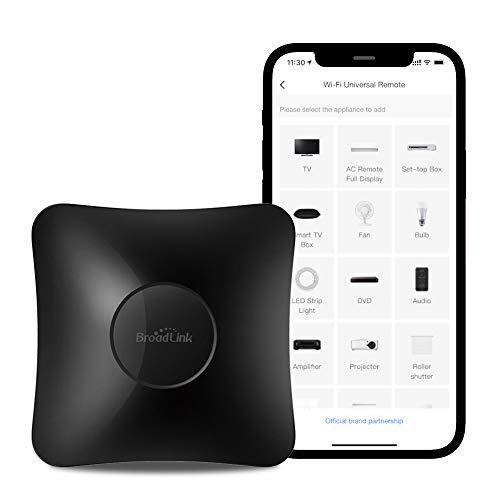
- BroadLink RM4 Pro still makes sense when phone control, IR/RF support, and automation matter more than a physical remote.
- Alexa Voice Remote Pro, X1S, U3, Function101, Inteset, Flipper, Philips, Circle, and Harmony Elite each serve narrower use cases.
Best Universal Remotes Comparison Table
Here is how the best universal remotes compare side by side.
| My Pick | Best App | Fire TV | Mid-Tier Hub | Button Pick | |
|---|---|---|---|---|---|

|
|

|

|

|
|
| SofaBaton X2 | BroadLink RM4 Pro | Alexa Voice Remote Pro | SofaBaton X1S | SofaBaton U3 | |
| Devices Controlled | Huge device database | Unlimited compatible devices | Compatible Fire TV devices | Up to 60 devices | Compatible IR, Bluetooth, and learnable RF gear |
| Favorite Channels | Custom activities and scenes | No physical channel buttons | Two programmable buttons | Activity-based shortcuts | One-touch macros |
| Smart Home Controls | Alexa, Google, Home Assistant | IR, RF, Alexa, Google, IFTTT | Alexa routines and commands | Limited smart-home support | No Wi-Fi smart-home hub |
| Voice Assistant Support | Alexa and Google Assistant | Alexa and Google Assistant | Alexa | Alexa and Google Assistant | Google voice on compatible Bluetooth devices |
| Mobile App | Yes, for setup and activities | Yes, iOS and Android | Fire TV app optional | Yes, for setup | Yes, for setup |
| Setup Difficulty | Moderate, worth the work | Moderate app setup | Easy Fire TV pairing | Moderate hub setup | Moderate app setup |
| Battery Life | Rechargeable remote | N/A | AAA batteries | USB-C rechargeable | Around three weeks |
| Power Source | Charging dock | USB power | Two AAA batteries | USB-C charging | 1200mAh rechargeable; USB-C |
| Size | Handheld remote plus hub | Compact hub | Slim handheld remote | Remote plus hub | Traditional handheld remote |
| Weight | Premium handheld feel | Small hub footprint | Lightweight remote | Lighter than X2 | Handheld button remote |
| Biggest Weakness | Premium price | No handheld remote | Fire TV only | Recent ratings concern | No Wi-Fi hub |
| Check Price | Check Price | Check Price | Check Price | Check Price |
#1 – SofaBaton X2: Premium Hub
At a Glance
- Compatibility: IR, Bluetooth, RF, Wi-Fi, Alexa, Google Assistant, and Home Assistant.
- Power / Battery: Rechargeable remote with charging dock.
- Voice / Smart Home: Smart-home support is part of the appeal.
- Screen / Display: Touchscreen for devices, scenes, and activities.
- Use Case: Premium whole-room control.
Overview
SofaBaton sent me the X2 to test, and I am currently putting it through the paces.
The X2 jumps to the top of this best universal remotes update because it finally gives SofaBaton a more premium touchscreen-and-dock setup. Early testing has been encouraging, especially in a living room where a TV, streamer, soundbar, and smart-home gear all need to behave like one system.
The charging dock is not just a nice extra. It makes the remote feel like a permanent controller instead of another handheld device that disappears between couch cushions, and the touchscreen gives it a more polished feel than the X1S.
Pros
- Touchscreen feels premium
- Dock solves charging clutter
- Wide device support
- Promising early testing
Cons
- Premium price
- Setup still takes patience
- Needs long-term testing
SofaBaton X2 lets you command your entire home entertainment system with an intuitive touchscreen remote.
Video Review
Here is a SofaBaton X2 unboxing I filmed over on my TecTimmy channel.
#2 – BroadLink RM4 Pro: Best App Hub
At a Glance
- Compatibility: IR and RF devices, including TVs, fans, boxes, and some smart-home gear.
- Power / Battery: USB-powered hub.
- Voice / Smart Home: Alexa, Google Assistant, and IFTTT support.
- Screen / Display: Uses the BroadLink phone app.
- Use Case: App-first control and automation.
Overview
The BroadLink RM4 Pro is still one of my favorite app-based ways to control legacy IR and RF devices, and it belongs in this best universal remotes list for app-first rooms. It is not a traditional handheld remote, but it absolutely fits if your real goal is controlling more gear from fewer places.
The app walks you through setup, and once it is working, you can build routines for TVs, set-top boxes, ceiling fans, audio gear, and even air conditioning units. Voice control through Google Assistant or Amazon Alexa makes it feel much more modern than the price suggests.
I would not buy this for someone who wants tactile channel surfing. I would buy it for a smart-home tinkerer who wants a flexible hub without paying premium-remote money.
Pros
- Strong app control
- Handles IR and RF
- Works with voice assistants
- Great automation value
Cons
- No physical clicker
- Setup can sprawl
- Not for button people
#3 – Alexa Voice Remote Pro: Fire TV Upgrade
At a Glance
- Compatibility: Compatible Fire TV devices.
- Power / Battery: AAA batteries.
- Voice / Smart Home: Alexa voice control.
- Screen / Display: No screen.
- Use Case: Better Fire TV control without buying another streaming box.
Overview
The Alexa Voice Remote Pro replaces the old streaming-box slot because this post needs to stay focused on remotes. If Fire TV is the platform you actually use every day, this is the cleaner upgrade than buying a whole streaming box just to get better control.
I like the backlit buttons, programmable shortcuts, and remote finder feature. It still will not consolidate a serious home theater like the X2 or X1S, but it makes Fire TV rooms easier to live with.
That is the whole point of the best universal remotes conversation: the right answer is not always the biggest system. Sometimes the right answer is the one remote that fixes the platform your family actually opens every night.
Pros
- Backlit buttons help
- Remote finder is useful
- Programmable buttons save taps
- Excellent Fire TV fit
Cons
- Fire TV only
- No full-room hub
- AAA batteries remain
#4 – SofaBaton X1S: Mid-Level Hub
At a Glance
- Compatibility: IR, Bluetooth, Wi-Fi, TVs, DVD players, Blu-ray players, AV receivers, soundbars, and streamers.
- Power / Battery: USB-C rechargeable remote.
- Voice / Smart Home: Alexa and Google Assistant support.
- Screen / Display: Small OLED-style display, not a touchscreen.
- Use Case: Hub control for less than the X2.
Overview
As an owner of the SofaBaton X1S, I still respect what this remote tries to do. It can manage a complicated entertainment stack and supports a huge device database, which is exactly why it became my go-to before the X2 showed up.
That said, recent user ratings make it harder to keep as the lead recommendation. It trims the price and skips the nicer X2 touchscreen, but the setup process still rewards patience, and the wheel/display interface is not as premium.
For the best universal remotes list, that makes the X1S a mid-level hub pick now. It is still useful, but I would rather lead with the X2 if someone is buying into the SofaBaton ecosystem today.
Pros
- Costs less than X2
- Broad device support
- USB-C rechargeable
- My prior daily driver
Cons
- Recent ratings worry me
- No X2 touchscreen
- Setup takes patience
SofaBaton X1S offers similar core functionality to the X2, minus the touchscreen, at a lower price.
#5 – Button-Style Universal: SofaBaton U3
At a Glance
- Control: Compatible IR, Bluetooth/BLE, and learnable 433/315 MHz RF gear.
- Power: 1200mAh rechargeable battery with USB-C charging; around three weeks per charge.
- Display: 2.4-inch LCD with wake-on-lift.
- Voice / Air Mouse: Device-dependent on compatible Bluetooth devices; no Wi-Fi hub.
Overview
The SofaBaton U3 is a strong current pick among the best universal remotes for readers who want one handheld controller for compatible living-room equipment without adding a hub. It supports compatible IR and Bluetooth devices, learns compatible 433/315 MHz RF commands, and can maintain up to three compatible Bluetooth connections at the same time.
The U3 works especially well for a TV, soundbar, streamer, and other equipment that can be controlled directly. One-touch macros can handle routine actions such as powering on the TV, switching inputs, and adjusting volume. Its 2.4-inch LCD, rechargeable 1200mAh battery, and USB-C charging make it a practical current button remote.
This is not the universal answer for every room. The U3 does not offer Wi-Fi hub control, hidden IR equipment needs the optional R1 repeater, and its Air Mouse and Google voice features work only with compatible Bluetooth devices. Choose it for simple button-first control, not for a smart-home-heavy installation.
Pros
- Combines compatible IR, Bluetooth/BLE, and RF learning.
- Keeps up to three compatible Bluetooth devices connected at once.
- Rechargeable battery and USB-C replace disposable batteries.
- Macros reduce repeat TV-and-audio steps.
Cons
- No Wi-Fi or full smart-home hub control.
- IR devices need line of sight without the optional repeater.
- Google voice and Air Mouse depend on compatible Bluetooth gear.
#6 – Function101 Bluetooth: Apple TV Buttons

At a Glance
- Compatibility: Apple TV 4K and Apple TV HD models.
- Power / Battery: Two AAA batteries.
- Voice / Smart Home: No Siri voice button.
- Screen / Display: No screen.
- Use Case: Apple TV users who want real buttons.
Overview
I have tested the Function101 remote with Apple TV, and I love the idea behind it. It gives Apple TV users a traditional button layout instead of forcing everyone to love the Siri Remote’s touch-heavy feel.
The Bluetooth version is the better current pick for this roundup. It is narrow, yes, but that is not a problem if the room’s daily pain point is Apple TV navigation.
In a list of the best universal remotes, Function101 is not the broadest recommendation. It is the practical specialty pick for Apple TV people who want channel-style control and fewer accidental swipes.
Pros
- Real Apple TV buttons
- Bluetooth model is current
- Easy for guests
- Traditional directional pad
Cons
- Apple TV focused
- No Siri button
- Not a full hub
#7 – Inteset 4-in-1: Streamer Buttons

At a Glance
- Compatibility: Up to four IR devices, including streamers with compatible IR receivers.
- Power / Battery: AAA batteries.
- Voice / Smart Home: No voice assistant support.
- Screen / Display: No screen.
- Use Case: Backlit learning remote for streamer-heavy rooms.
Overview
The Inteset 4-in-1 Universal Backlit IR Learning Remote is the unglamorous middle of this list, and I mean that as a compliment. It gives you physical controls, backlighting, and learning support without pretending to be a smart-home hub.
It can control up to four devices, including streaming boxes, gaming consoles, and cable or satellite receivers when the setup supports IR. That makes it useful for rooms where a simple remote pile needs to become one clicker.
This is not the sexy choice. It is the reliable utility pick that still earns a place among the best universal remotes because not every room needs an app or touchscreen.
Pros
- Backlit keys are practical
- Learning support helps
- Good streamer layout
- Simple midrange option
Cons
- IR-focused control
- No voice support
- Looks old-school
Inteset 4-in-1 is a backlit budget remote pre-programmed for Apple TV, Roku, and more.
#8 – Flipper Big Button: Senior Friendly

At a Glance
- Compatibility: TVs plus cable or satellite boxes.
- Power / Battery: AAA batteries.
- Voice / Smart Home: No voice assistant support.
- Screen / Display: No screen.
- Use Case: Simple control for seniors.
Overview
The Flipper Big Button Remote is the simple, user-friendly pick for seniors or anyone who wants fewer ways to get lost. It combines TV and cable or satellite controls, which can remove a lot of daily remote confusion.
The appeal is not advanced automation. The appeal is fewer buttons, favorite-channel control, and a layout that does not punish someone for pressing the wrong thing.
That makes Flipper one of the best universal remotes for a very specific reason. It solves the human problem first.
Pros
- Large buttons are clear
- Favorite channels help
- Simple daily operation
- Great senior option
Cons
- Limited advanced control
- No smart-home features
- Not for streamers
The Flipper Remote simplifies TV and cable control with large buttons—perfect for seniors.
#9 – Philips Universal Remote: Cheap Backup
At a Glance
- Compatibility: Basic TV and home-entertainment control.
- Power / Battery: AAA batteries.
- Voice / Smart Home: No voice assistant support.
- Screen / Display: No screen.
- Use Case: Cheap backup for simple rooms.
Overview
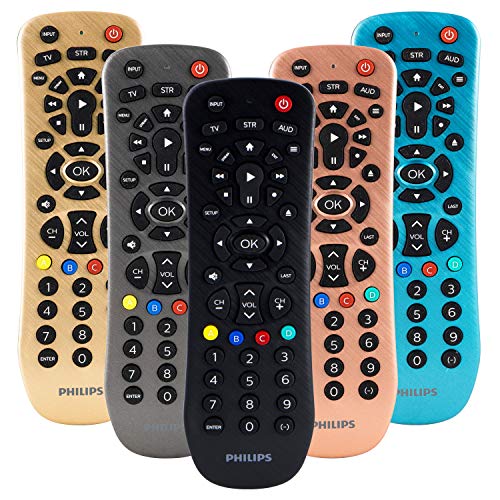
The Philips remote is the budget backup slot after dropping the GE pick. It is not here to impress home-theater people; it is here for a guest room, older TV, or simple setup where basic control is enough.
I would keep expectations realistic. Cheap universal remotes are not miracle workers, but they can still solve the missing-clicker problem without dragging the reader into a premium hub purchase.
That limited job is why Philips stays in this best universal remotes draft for now. It gives budget readers a backup option without pretending to compete with the premium hubs.
Pros
- Cheap backup option
- Simple button layout
- Useful for spare rooms
- Low setup ambition
Cons
- Basic plastic feel
- Limited smart features
- Not a premium pick
- Multi Device Control - Operate Up To 3 Different Audio And Video Components Such As Tvs, Blu-Ray/Dvd Players, Cable/Satellite Receivers, Roku Boxes And Other Streaming Media Players, Soundbars And More
- Best Remote Code Library - This Universal Remote Works With All Major Brands And Supports Thousands Of The Latest Audio/Video Equipment
#10 – Circle Remote 3: One to Watch
At a Glance
- Compatibility: Enthusiast smart-home and theater setups.
- Power / Battery: Rechargeable design.
- Voice / Smart Home: Smart-home integrations depend on setup.
- Screen / Display: Touchscreen-style interface.
- Use Case: Future-looking universal remote fans.
Overview
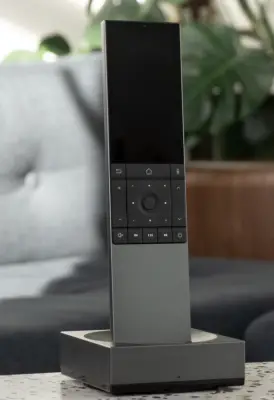
Circle Remote 3, formerly tied to the Yio Remote story, is the enthusiast pick I still want in the article. It speaks to the part of the audience that misses Harmony and wants a modern, customizable controller for a serious smart home.
I would not make it the default buying recommendation because availability, price, and support are different questions than an Amazon-ready remote. But it keeps the article current and gives advanced readers something real to watch.
That matters because the best universal remotes category is not dead. It is just smaller, nerdier, and more specialized than it used to be.
Pros
- Modern enthusiast concept
- Customizable control story
- Keeps category current
- Harmony crowd will care
Cons
- Not the easy buy
- Availability can vary
- Less mainstream support
The Unfolded Circle Remote 3 is not available yet available.
However, you can join the Denmark-based company's waitlist by clicking on the Reserve button below.
#11 – Logitech Harmony Elite: Legacy Pick

At a Glance
- Compatibility: Huge legacy Harmony device database.
- Power / Battery: Rechargeable remote with hub.
- Voice / Smart Home: Alexa, Google Assistant, Apple HomeKit, and smart-home integrations.
- Screen / Display: Color touchscreen.
- Use Case: Existing Harmony owners and legacy buyers.
Overview
I have owned the Harmony Elite for years, and I still understand why people miss it. The touchscreen, activity control, hub, and huge device database made it feel like the king of universal remotes for a long time.
But Logitech discontinued the Harmony line, and that changes the recommendation. Limited quantities still exist, often at premium prices, but I would not tell a normal reader to start there today.
So Harmony Elite moves to the end as the Legacy Pick. It is still part of the story, but the current buying advice belongs above it.
Pros
- Legendary activity control
- Huge device database
- Excellent touchscreen remote
- Still useful if owned
Cons
- Discontinued product line
- Often overpriced now
- Not my first buy
The discontinued Harmony Elite remains a top-tier remote for smart home and theater control — if you can find one.
FAQs
These are common questions about the best universal remotes.
1. What are the best universal remotes for most homes?
Most homes should start with a hub-based remote if the TV, streamer, soundbar, and receiver all need coordinated control. A simpler infrared remote makes more sense for a bedroom, guest room, or senior-friendly setup. The room matters more than the spec sheet, especially when several people share the same remote every day in family rooms.
2. Should I replace every streaming remote?
Replacing every streaming remote is unnecessary when one platform already controls the room well. The best universal remotes help most when several devices require separate power, volume, input, and playback controls. If one Roku, Apple TV, or Fire TV remote already solves the daily problem, keep the simpler setup instead for now without adding friction.
3. Are hub remotes still worth buying?
Hub remotes are still worth buying for rooms with mixed gear, hidden components, or smart-home routines. The best universal remotes in this class reduce input switching, power sequencing, and receiver confusion. They are overkill for one TV and one streamer, but valuable when the entertainment cabinet has several separate boxes or shared family rooms too.
4. Do cheaper remotes work with smart TVs?
Cheaper remotes can work with smart TVs when basic power, volume, channel, and input control are enough. The best universal remotes for budget rooms usually skip advanced app navigation, voice control, and activity automation. Check compatibility before buying, because model support matters more than a broad marketing claim on listings across every room at home.
5. Which remote is easiest for seniors?
The easiest remote for seniors usually has fewer buttons, clear labels, favorite-channel support, and limited ways to get lost in menus. The best universal remotes for this use case are rarely the most advanced models. A simple Flipper-style remote can beat a premium touchscreen when clarity and repeatable daily use matter without constant troubleshooting later.
Best Universal Remotes: Verdict
The best universal remotes choice depends on whether you need whole-room control or a simpler replacement clicker. I would keep the decision anchored to the room, not the spec list.
- Choose SofaBaton X2 if you want the premium hub remote with the touchscreen, dock, and broadest whole-room control story.
- Choose BroadLink RM4 Pro or SofaBaton X1S if you want lower-cost hub control and can live with setup quirks.
- Choose Alexa Voice Remote Pro, SofaBaton U3, Function101, Inteset, or Flipper if the room needs a narrower fix.
The Harmony Elite still matters historically, but I would not make a discontinued remote the lead recommendation now. If you are specifically replacing an old Logitech setup, my Logitech Harmony alternatives guide is the better next stop.
If you are shopping by TV brand instead of by remote type, start with my guides to the best LG smart TV remotes, best Philips smart TV remotes, and best universal remotes for Sharp TVs.

Please subscribe for a fun take on tech—tips, unboxings, reviews & more!