
As an Amazon Associate, I earn from qualifying purchases.
In this article, I'll provide my top five recommendations on the best remotes for NVIDIA Shield TV you can get right now.
SHIELD is Getting Better
 While it not as popular as Apple TV or Roku yet, Android TV is definitively a fan favorite of the technical set.
Many who like to run Android TV typically go with NVIDIA SHIELD with Chromecast 4K built-in as their streaming media device of choice.
NVIDIA recently made SHIELD faster and added support for Dolby Vision and Dolby Atmos.
They also put Google Assistant right inside the box for voice control. Plus, the new NVIDIA® Tegra® X1+ processor with a 256-core NVIDIA GPU with 2 GB RAM, NAS access, and Plex Server capabilities make this a beast for streamers and gamers alike. [There is also a robust library of games included with the box itself and via Android.]
The remote is getting better too. Read on for a brief history lesson if you are interested in learning about the remote that ships with Shield TV.
NVIDIA Shield Remote Comparison Table
Here is how my five picks for the best remotes for NVIDIA Shield compare at a glance.
| Best Overall for Shield | Budget LCD Universal | Premium Home-Theater Pick | Value Hub | Keyboard Pick | |
|---|---|---|---|---|---|
| Product Image |

|

|

|

|
|
| Model | NVIDIA Shield Remote | SofaBaton U3 | SofaBaton X2 | SofaBaton X1S | Yatao-listed W1 Air Mouse |
| Rank | 1 | 2 | 3 | 4 | 5 |
| Best Fit | Best fitChoose NVIDIA's remote when complete Shield navigation and native voice matter most. | Best fitChoose the U3 for rechargeable universal control without adding a Wi-Fi hub. | Best fitChoose the X2 for premium system control after confirming a model-specific Shield path. | Best fitChoose the X1S for lower-cost hub control after verifying your Shield connection. | Best fitChoose the W1 for keyboard input on a Shield TV Pro with a free USB port. |
| Smart Home | |||||
| Devices Controlled | Shield plus basic TV control | Shield plus compatible AV gear | Shield plus home theater | Shield plus home theater | One USB host device |
| Dedicated Hub | |||||
| Connectivity | Bluetooth and IR | IR, Bluetooth, learnable RF | IR, Bluetooth, RF, Wi-Fi | IR, Bluetooth, RF, Wi-Fi | 2.4 GHz RF receiver |
| Rechargeable | |||||
| Voice Control | Google Assistant | Model dependent | Alexa, Google, Home Assistant | Alexa and Google | None |
| Battery | Replaceable batteries | 1200mAh USB-C | 1200mAh with dock | 1050mAh USB-C | Rechargeable |
| Screen / Display | None | 2.4-inch LCD | Color touchscreen | 2-inch OLED | 45-key keyboard |
| Shield Limitation | None; native Shield control | Verify profile and every command | Bluetooth D-pad commands unavailable | Bluetooth D-pad commands unavailable | USB-host Shield models only |
| Check Price | Check Price | Check Price | Check Price | Check Price | Check Price |
NVIDIA Shield Remote
SofaBaton U3
SofaBaton X2
SofaBaton X1S
Yatao-listed W1 Air Mouse
#1 – NVIDIA Shield Remote: Best Overall for Shield
Best Fit
Choose NVIDIA's remote when complete Shield navigation and native voice matter most.
The latest generation NVIDIA Shield remote is next on my list of the best remotes for NVIDIA Shield. It has some great features that make it a solid option for any power SHIELD TV user.
While earlier versions of this remote had problems that led to many negative reviews and feedback, the company has since addressed these problems. Deservingly so, the updated remote has earned many raving fans over at Amazon and out of the forums.
Its backlit buttons light up on wake, and you can use voice search with Google Assistant to find new movies, TV shows, or YouTube videos. You can also use the “Find Lost Remote” feature to locate your lost remote and the IR blaster to control your TV. Plus, it connects to your SHIELD TV using wireless Bluetooth so you can control SHIELD even if it’s inside your entertainment center. It won’t control all of your home theater equipment, though, so it is not a true “universal remote” like Sofabaton in that sense.
Still, if you primarily use Shield for your entertainment, this is a great option.
Pros
- Native Shield navigation and voice search
- Motion-activated backlit buttons
- Customizable menu button
- Find Lost Remote feature
- IR control for compatible TVs
Cons
- Not a full universal remote
- Adds another handset to the setup
#2 – SofaBaton U3: Best Universal
Best Fit
Choose the U3 for rechargeable universal control without adding a Wi-Fi hub.
The SofaBaton U3 is the current button-style universal option for an NVIDIA Shield setup that also includes a compatible TV, soundbar, receiver, or streamer. It supports compatible IR and Bluetooth devices, learns compatible 433/315 MHz RF commands, and can keep up to three compatible Bluetooth devices connected at the same time.
For the best remotes for NVIDIA Shield, the U3 is a fit for readers who want physical buttons and simple macros instead of a hub or touchscreen. It can simplify the equipment around the Shield by combining compatible TV, input, and audio actions into one routine. The rechargeable battery, USB-C charging, and 2.4-inch LCD suit daily direct control.
The key limitation is that Shield compatibility depends on the exact model, pairing method, and SofaBaton profile. Verify essential navigation and media controls before retiring the original Shield remote. Readers who rely on Shield voice search should keep the original NVIDIA remote nearby.
Pros
- Modern button-style control
- Compatible Bluetooth/BLE support
- Learns compatible 433/315 MHz RF
- Macros simplify common routines
- USB-C charging and clear LCD
Cons
- Shield controls need model verification
- Not every voice-search feature transfers
- No Wi-Fi hub for hidden gear
Rechargeable LCD universal remote, no hub required.
#3 – SofaBaton X2: Premium Home-Theater Pick
Best Fit
Choose the X2 for premium system control after confirming a model-specific Shield path.
The SofaBaton X2 is my Premium Home-Theater Pick because its color touchscreen, charging dock, hub, and activity control can run a larger entertainment setup.
SofaBaton says NVIDIA Shield Bluetooth remote pairing currently lacks directional and channel commands. Treat the X2 as a system-control upgrade, not the safest native Shield replacement, and confirm a working model-specific control path before buying.
Pros
- Premium color touchscreen and charging dock
- Hub reaches compatible hidden equipment
- Activities combine compatible AV devices
- IR, Bluetooth, RF, and Wi-Fi support
- Current flagship SofaBaton design
Cons
- Bluetooth Shield navigation is incomplete
- Costs more than the X1S or U3
Touchscreen hub remote for a full home-theater setup.
#4 – SofaBaton X1S: Value Hub
Best Fit
Choose the X1S for lower-cost hub control after verifying your Shield connection.
First, let me start by saying, I just purchased this remote over Amazon Prime Day and while I’m just getting under the hood, I’m already a big fan!
The SofaBaton X1S is a universal remote control that can be used to control your TV, streaming media players, Blu-Ray player, surround sound setup and other devices. In fact, it will control over 500,000 devices from 5,000 brands, which means it will most likely control everything you own today.
The all-in-one remote has customizable activity buttons for easy access to your most commonly used functions. For example, a “Watch TV” activity can be set to power on your TV, change over to your cable box, turn on your surround set up, and even dim Philips Hue smart lights if you have those.
It also comes with two IR blasters in the box that you can use to control closed cabinet devices. The X1S also has a built-in wireless hub which allows you to connect up to 15 devices via Wi-Fi so they can be controlled by the remote. You can even control your entire setup using your smartphone via the Sofabaton app.
Pros
- Hub controls compatible hidden equipment
- Activities simplify multi-device routines
- Companion app can control the setup
- Two included IR blasters
- Lower price than the X2
Cons
- Bluetooth Shield navigation is incomplete
- OLED screen is not a touchscreen
SofaBaton X1S offers similar core functionality to the X2, minus the touchscreen, at a lower price.
#5 – Yatao-listed W1 Air Mouse: Keyboard Pick
Best Fit
Choose the W1 for keyboard input on a Shield TV Pro with a free USB port.
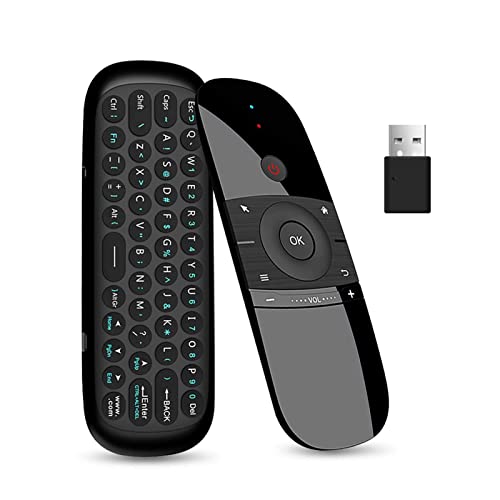
Last on my list of the best remotes for NVIDIA Shield is the Yatao-listed W1 Air Mouse, the exact ASIN now attached to the product link Tim supplied.
For the money, I still like the keyboard idea for YouTube searches and other text-heavy Shield tasks. The listing identity is messy—it still references WeChip in places—so I am binding this recommendation to ASIN B07WRZNW6X rather than claiming Yatao is the manufacturer.
The W1 combines a 45-key keyboard, air mouse, and remote controls in one rechargeable device. It uses a 2.4 GHz USB receiver, with a listed range of up to 10 meters.
That USB receiver limits direct compatibility to Shield models with a USB host port, including NVIDIA Shield TV Pro. The tube-style Shield TV has no USB host port, so this is not a direct fit for that model.
Pros
- Keyboard helps with searches and logins
- Air mouse adds pointer control
- Rechargeable instead of disposable batteries
- Plug-and-play USB receiver
- Listed range up to 10 meters
Cons
- Listing brand identity is inconsistent
- Requires a Shield model with USB host
- Not a Bluetooth universal remote
FAQs
These are the questions to answer before replacing the remote that came with your Shield.
1. Can I use a universal remote on my NVIDIA Shield?
Yes, but compatibility depends on the remote, Shield model, connection method, and command profile. Shield navigation needs Bluetooth or a compatible USB receiver rather than an ordinary infrared-only remote. Verify directional, media, and voice commands before storing the original remote, because some universal profiles do not reproduce every function reliably.
2. Which model is the best overall choice?
NVIDIA's own remote is the safest overall choice when complete navigation, native voice search, backlit buttons, and the lost-remote finder matter most. It will not consolidate a TV, receiver, and other equipment like a universal remote, but it avoids the missing-command risk documented for some third-party Bluetooth profiles.
3. Which universal remote should I consider first?
The SofaBaton U3 is the strongest hub-free universal candidate here. It combines physical buttons, a 2.4-inch LCD, rechargeable power, macros, and compatible infrared, Bluetooth, and learnable radio-frequency control. Use SofaBaton's NVIDIA SHIELD Voice Remotes profile, then test navigation, playback, and voice before retiring the original remote.
4. Why isn't the SofaBaton X2 ranked first?
The X2 is the more capable multi-device controller, but SofaBaton says its NVIDIA Shield Bluetooth implementation currently lacks directional and channel commands. That makes it a premium home-theater pick rather than the safest Shield-first recommendation. Confirm a working model-specific path before relying on it for daily navigation.
5. Will the Yatao-listed W1 work with every Shield model?
No. The W1 uses a 2.4 GHz USB receiver rather than Bluetooth, so direct compatibility is limited to Shield models with a USB host port, including Shield TV Pro. The tube-style Shield has no USB host port. Its listing identity is inconsistent, so this recommendation remains tied specifically to Amazon ASIN B07WRZNW6X.
Best Remotes for NVIDIA Shield: My Verdict
Picking between the best remotes for NVIDIA Shield comes down to whether native control or multi-device consolidation matters more.
- Gold: NVIDIA Shield Remote if complete native navigation and voice search matter most.
- Silver: SofaBaton U3 if you want hub-free universal control and will verify every Shield command.
- Bronze: SofaBaton X2 if premium home-theater activities matter more than guaranteed Bluetooth navigation.
Keep the original Shield remote nearby until every third-party navigation, playback, and voice command works in your exact setup.

Please subscribe for a fun take on tech—tips, unboxings, reviews & more!