As an Amazon Associate, I earn from qualifying purchases.
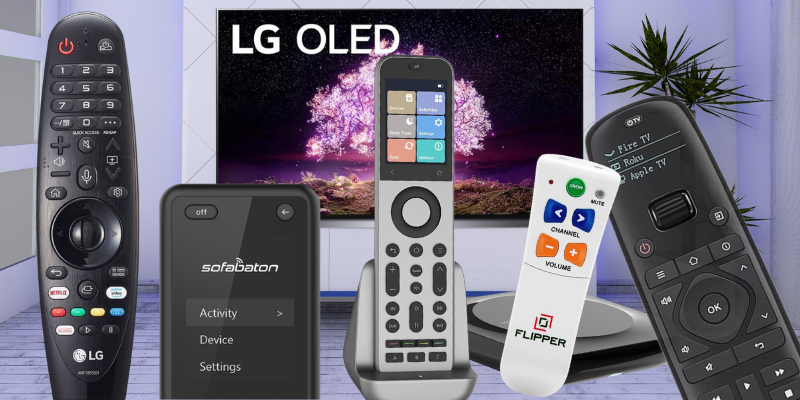
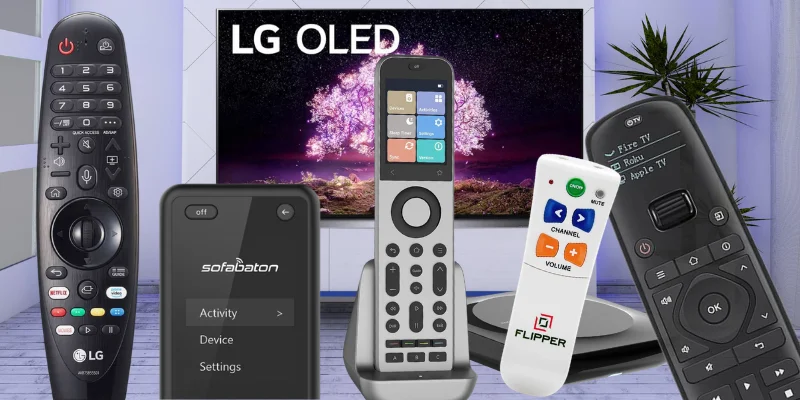
In this article, I compare the seven best remotes for LG TVs I would actually use after years of living with LG webOS TVs.
Life’s Good… If Your Remote Works

I have owned LG TVs for the better part of 10 years, and the remote has always been the part that decides whether webOS feels smooth or annoying.
The Magic Remote is great when the pointer, wheel, and voice button behave. It is maddening when lag, missed commands, and input switching get in the way.
That matters because the broader universal-remote market keeps expanding across price tiers, as Polaris Market Research tracks. LG owners still have a very specific problem: replacing or upgrading the Magic Remote without making the room harder to use.
For this update, I am weighing that history against the current LG setup in my bedroom plus the universal remotes I have tested directly.
Key Takeaways
- SofaBaton X2 is the one to beat when the TV shares the room with a soundbar, streamer, receiver, and smart-home gear.
- LG Magic Remote is the right OEM swap when nothing has changed. Stay native if you only need the LG TV, webOS, pointer control, and model-year compatibility.
- Match the household, not the spec sheet. A Flipper Big Button for older relatives or a Gvirtue Universal for the spare bedroom can be the right call.
Best Remotes for LG TVs Comparison Table
Here’s how the top picks for the best remotes for LG TVs compare side by side.
| Editor’s Choice | Best OEM Option | Premium Hub Pick | Best for Accessibility | Budget Universal Pick | |
|---|---|---|---|---|---|
| Product Image |

|

|

|

|

|
| Model | SofaBaton X2 | LG Magic Remote | SofaBaton X1S | Flipper Big Button | SofaBaton U3 |
| Controls Home Theater Devices | Limited | Limited | Compatible gear | ||
| Controls Smart Home Devices | Limited | ||||
| Voice Assistants | Alexa, Google, Home Assistant | LG voice (model-dependent) | Alexa and Google Assistant | Google on compatible Bluetooth devices | |
| Display Type | 2.4-inch HD touchscreen | Pointer UI on TV | Color LCD with scroll wheel | None | 2.4-inch LCD |
| Devices Supported | Up to 50 | LG TV only | Up to 60 | TV plus one source | IR / Bluetooth / RF gear |
| Battery | Rechargeable plus dock | Two AA batteries | Rechargeable | Two AA batteries | 1200mAh rechargeable; USB-C |
| Backlit Buttons | Model-dependent | Not confirmed; wake-on-lift display | |||
| Streaming Services | Apple TV, Fire TV, Roku, Shield | LG webOS apps | Apple TV, Fire TV, Roku, Shield | TV plus box | Model-dependent; verify device profile |
| LG TV Fit | Whole-room LG TV control | LG webOS and Magic Remote replacement | LG TV hub control without touchscreen | Accessibility-first homes | Compatible LG rooms; verify model |
| Check Price | Check Price | Check Price | Check Price | Check Price | Check Price |
SofaBaton X2
LG Magic Remote
SofaBaton X1S
Flipper Big Button
SofaBaton U3
#1 – SofaBaton X2: Editor’s Choice
At a Glance
- Display: 2.4-inch HD touchscreen with quick-access keypad
- Voice: Alexa, Google Assistant, Home Assistant
- Devices: Up to 50 across IR, Bluetooth, Wi-Fi, RF
- Power: Rechargeable battery with charging dock
SofaBaton X2 has been the daily driver in my own home theater since SofaBaton provided a review unit for testing. In a busy LG room, it is the one I keep reaching for. The touchscreen puts the activities I actually use one tap away. The hub plus two IR blasters reach the LG OLED tucked into a cabinet, the soundbar across the room, and the Apple TV stuffed behind the receiver.
For an LG OLED or webOS smart TV room with a streamer, soundbar, set-top box, and a Blu-ray player, SofaBaton X2 collapses every clicker into one device that an adult can actually operate. The SofaBaton database covers most brand-name gear without code lookup, so setup feels like picking a model from a menu instead of typing in IR codes from a manual.
Pros
- Color touchscreen with custom shortcuts and activities
- R1 hub plus two IR blasters cover hidden gear
- Works cleanly with Alexa, Google Assistant, and Home Assistant
- Rechargeable battery and charging dock, no AAs
Cons
- Premium price will feel steep for a single-TV bedroom
- Activity setup takes a careful first half hour
Touchscreen hub remote for a full home-theater setup.
#2 – LG Magic Remote: Best OEM Option
At a Glance
- Display: Pointer UI rendered on the TV
- Voice: LG voice assistant (model-dependent)
- Devices: LG TV only
- Power: Two AA batteries
If the LG TV is the only thing in the room, just stay native. Among the best remotes for LG TVs in the OEM lane, a genuine LG Magic Remote pairs cleanly with compatible OLED, Signature, NanoCell, QNED, and UHD sets, gives you the pointer the engineers actually intended, and keeps the LG voice button working the way the manual promised.
The only catch is model-year compatibility, which varies more than it should. LG lists the AN-MR18BA Magic Remote for select AI ThinQ smart TVs, including B8, C8, E8, and W8 OLED families, plus several SK and UK series models. Confirm your TV’s exact model number before clicking buy. If your setup is LG-only and the webOS app menu is where you actually spend your time, the Magic Remote is the cleanest path back to normal.
Pros
- Native webOS integration and pointer navigation
- LG voice search wakes from a dedicated button
- OEM build quality and weight in the hand
- Matching MR-series remote restores factory behavior exactly
Cons
- Model-year pairing is fussy, double-check before buying
- Will not control a soundbar, streamer, or set-top box
The official LG AN-MR18BA remote adds voice control and app buttons to 2018 Smart TVs.
#3 – SofaBaton X1S: Premium Hub Pick
At a Glance
- Display: Color LCD with scroll wheel
- Voice: Alexa and Google Assistant
- Devices: Up to 60 across IR, Bluetooth, Wi-Fi, RF
- Power: Rechargeable lithium battery
SofaBaton X1S is what I tested for months before the SofaBaton X2 launched, and it is still the smartest LG pick when the SofaBaton X2 touchscreen feels like overkill. The scroll wheel and color LCD make activity selection genuinely fast, the 60-device cap is the highest in the segment, and the backlit buttons earn their keep in a dark living room.
For an LG TV owner who wants premium hub control without the touchscreen learning curve, SofaBaton X1S hits the sweet spot. Alexa and Google integration are clean, the IR plus Bluetooth and Wi-Fi mix handles modern soundbars and streamers, and the app keeps setup recoverable when a new device joins the room next year.
Pros
- Highest device cap in this lineup at 60
- LCD plus scroll wheel makes activities one-handed
- Backlit buttons help during late-night use
- Alexa and Google Assistant voice support
Cons
- LCD is smaller than SofaBaton X2’s touchscreen
- App-based setup has an honest learning curve
SofaBaton X1S offers similar core functionality to the X2, minus the touchscreen, at a lower price.
Video Review
Here’s SofaBaton X1S in action across a real living-room setup.
🎥 Video Credit: iVax
#4 – Flipper Big Button: Best for Accessibility
At a Glance
- Display: None
- Voice: None
- Devices: TV plus one source
- Power: Two AA batteries
Flipper Big Button is not trying to compete with the SofaBaton models, and that is the whole point. In this LG lineup, it is the one I send to my mother-in-law’s apartment because the buttons are big enough to actually find, the layout strips out the ten buttons nobody touches, and pairing is the kind of process you can finish on a phone call.
For elderly users, low-vision households, or anyone who finds the standard LG clicker a chore, the Flipper earns its slot through pure usability. It will not run a soundbar or a Roku, but that is not what you bought it for.
Pros
- Oversized tactile buttons in a high-contrast layout
- Pared-down feature set means almost zero learning curve
- AA battery life runs to a year of normal use
- Excellent for elderly users or vision-limited households
Cons
- Will not control a multi-device home theater
- No voice search, smart home, or activity programming
The Flipper Remote simplifies TV and cable control with large buttons—perfect for seniors.
#5 – Budget Universal Pick: SofaBaton U3
At a Glance
- Display: 2.4-inch LCD with wake-on-lift.
- Voice: Google voice on compatible Bluetooth devices.
- Devices: Compatible IR, Bluetooth, and learnable RF gear.
- Power: 1200mAh rechargeable battery with USB-C charging.
SofaBaton U3 is the rechargeable button-style pick I would use in a compatible LG room that includes a TV, soundbar, and streamer. It earns a place among the best remotes for LG TVs by combining direct IR control, supported Bluetooth connections, RF learning, and macros without requiring the X-series hub.
It should not be presented as a universal Magic Remote replacement. LG pointer, ThinQ voice, and model-specific webOS shortcuts can vary, while U3 Air Mouse and Google voice work only on compatible Bluetooth devices; buyers should verify the exact LG model and keep the original remote if those features matter.
Pros
- Controls compatible IR, Bluetooth, and learnable RF gear.
- Keeps up to three BLE devices connected and supports macros.
- Rechargeable USB-C battery; optional R1 repeater for hidden IR gear.
Cons
- No guaranteed Magic Remote pointer or ThinQ voice.
- No Wi-Fi or smart-home hub.
- Exact LG and Bluetooth support varies by model.
#6 – LG Factory Remote: Basic OEM Backup

At a Glance
- Display: None
- Voice: None
- Devices: Single LG TV
- Power: Two AA batteries
LG Factory Remote is the spare-remote-in-a-drawer pick in this LG lineup. The basic LG clicker has none of the smart features and none of the headaches. Power, volume, channel, source, menu. That is the whole feature list and it is exactly enough for a guest room, a vacation rental, or an emergency replacement on a Sunday night when the Magic Remote disappeared.
The plug-and-play pairing with LG sets that supported the original clicker means you do not need an app, a phone, or a manual. Crack the package, drop in two AAs, point at the TV.
Pros
- Plug-and-play on most LG TVs without setup
- Inexpensive enough to keep one in the drawer
- Familiar LG button layout, no learning curve
- Reliable IR range across an open living room
Cons
- No voice search, smart home, or universal control
- Limited to a single LG TV, no streamer or soundbar
This official LG AGF76631064 remote provides full-function control for LG TVs.
#7 – Gvirtue Universal: Bargain Backup

At a Glance
- Display: None
- Voice: None
- Devices: Single LG TV plus a basic source
- Power: Two AAA batteries
Of the bargain picks among the best remotes for LG TVs, Gvirtue Universal is the one I keep recommending when the budget is under fifteen dollars and the TV is in a bedroom nobody fights over. It will not impress a home-theater nerd, but it pairs without an app and covers the basics the day it arrives.
If your LG OLED is in the bedroom and you mainly need to flip channels, swap inputs for a streamer or a set-top box, and bump the volume, the Gvirtue covers the ground. Inventory cycles fast at this price point, so confirm Amazon stock before checkout.
Pros
- Lowest sticker price in the lineup
- Works on most LG TVs without setup
- Familiar layout that matches the original LG clicker
- No app or phone required to get it running
Cons
- No voice search or smart home support
- Stock availability rotates, check before buying
- No backlit buttons for night viewing
The Gvirtue AKB75095307 is a no-setup remote for nearly all LG TVs, with app buttons.
FAQs
Here are the questions readers send me most about the best remotes for LG TVs.
1. Can a single remote replace both my LG Magic Remote and my soundbar clicker?
Yes. The best remotes for LG TVs can consolidate the Magic Remote, a soundbar controller, a streamer remote, and any other IR or Bluetooth gear into one clicker. The SofaBaton X2 supports fifty devices simultaneously and leads the field for whole-room consolidation; SofaBaton X1S handles sixty and keeps setup recoverable through one simple phone app.
2. Do the best remotes for LG TVs work well with LG OLED TVs?
Yes. The remotes featured here for OLED owners are universal models that handle multiple devices reliably across IR, Bluetooth, and Wi-Fi protocols. SofaBaton’s X2 and X1S lead the field for full home-theater integration. Magic Remote remains the cleanest OEM option but will not reach external streamers, soundbars, receivers, or media players by itself without help.
3. Are LG Magic Remotes compatible with all LG Smart TV models?
No. Magic Remote compatibility is model-year specific. The best remotes for LG TVs in the OEM lane match the remote generation to the TV generation, so check the model number before buying. Newer MR-series Magic Remotes pair cleanly with recent LG TVs but will not work on the earliest webOS panels reliably for everyone today.
4. Do voice commands matter more than button layout on a universal remote?
Button layout matters more long-term. Among the best remotes for LG TVs, voice commands help with quick search and app launches, but most daily actions reduce to repeatable physical controls. Backlit buttons and an intuitive layout deliver more daily satisfaction than voice-first designs that demand precise wake-word phrasing during ordinary weeknight viewing for normal households.
5. What is the difference between the SofaBaton X2 and X1S for an LG setup?
SofaBaton X2 adds a touchscreen, charging dock, Home Assistant integration, and fifty-device support. SofaBaton X1S handles sixty devices through an LCD scroll-wheel interface and skips the dock. For LG OLED owners running streamers and soundbars, the best remotes for LG TVs balance device count against display type. Both remain top-tier picks in most rooms overall.
Best Remotes for LG TVs: Verdict
The best remotes for LG TVs replace every other clicker in the room and survive whatever LG ships in the next firmware update. Pick the one that matches your household, not just the spec sheet.
- Choose SofaBaton X2 if you want the touchscreen, the charging dock, and full home-theater orchestration.
- Choose LG Magic Remote if your setup is LG-only and the webOS pointer is what you actually use.
- Choose SofaBaton X1S if you want flagship control depth at a lower price point and do not need the touchscreen.
Compatible LG rooms deserve a look at the rechargeable SofaBaton U3 before settling for a basic factory clicker, while households with elderly users or accessibility needs should still put the Flipper at the top of their list. Across this full remote lineup, no single pick wins every room, but the seven above cover the real shape of the market.
For a deeper look at the SofaBaton lineup, read my SofaBaton X2 vs X1S breakdown.

Please subscribe for a fun take on tech—tips, unboxings, reviews & more!