
As an Amazon Associate, I earn from qualifying purchases.
In this post, I explore the best Logitech Harmony alternatives you can get right now.
The Best Replacements for Harmony

Since Logitech discontinued its Harmony remotes, many readers have asked me to recommend the best replacements.
The market certainly hasn’t disappeared. According to the Smart Remotes Segment Study, Statista projects steady annual growth of 5.94%.
I’ve personally tested every remote featured below. Here are the best Logitech Harmony alternatives based on ease of use, setup, functionality, and overall value.
Key Takeaways
🔸 Best Overall: SofaBaton X2 is the closest current premium replacement for a Harmony Elite-style setup.
🔸 Best Value: SofaBaton X1S keeps hub-based activities at a lower price, while the new U3 is the budget physical remote.
🔸 Budget App Pick: BroadLink RM4 Pro belongs at number five because it works more like the old Harmony Hub and app than a traditional handheld remote.
Logitech Harmony Alternatives Comparison Table
Here is how my top five Logitech Harmony alternatives compare at a glance.
| Best Overall | Best Value Hub | Budget LCD Universal | Best Voice Control | Best Budget App & Hub | |
|---|---|---|---|---|---|
| Product Image |

|

|

|
|
|
| Model | SofaBaton X2 | SofaBaton X1S | SofaBaton U3 | Fire TV Cube | BroadLink RM4 Pro |
| Rank | 1 | 2 | 3 | 4 | 5 |
| Best Fit | Best fitChoose X2 for the closest current match to a premium Harmony-style system. | Best fitChoose X1S for Harmony-style hub control at a lower price than X2. | Best fitChoose U3 for a physical LCD remote without paying for a hub system. | Best fitChoose Fire TV Cube when hands-free Alexa control matters more than one traditional remote. | Best fitChoose BroadLink when app automation matters more than having a handheld remote. |
| Hub Included | |||||
| Control | IR, Bluetooth, RF, Wi-Fi | IR, Bluetooth, Wi-Fi | IR, Bluetooth, learnable RF | HDMI-CEC, IR, Wi-Fi | IR, fixed-code RF, Wi-Fi |
| Backlit Controls | |||||
| Voice Control | Alexa, Google, Home Assistant | Alexa and Google Assistant | Device-dependent Bluetooth | Hands-free Alexa | Alexa and Google Assistant |
| Screen / Display | Color touchscreen | OLED-style display | 2.4-inch LCD | Uses the TV | Phone app |
| Power | Rechargeable with dock | USB-C rechargeable | USB-C rechargeable | Plug-in cube | USB-powered hub |
| Main Tradeoff | Highest price and setup curve | Setup takes patience | No Wi-Fi hub | Fire TV-first experience | No physical remote |
| Check Price | Check Price | Check Price | Check Price | Check Price | Check Price |
SofaBaton X2
SofaBaton X1S
SofaBaton U3
Fire TV Cube
BroadLink RM4 Pro
#1 – Best Overall: SofaBaton X2
Best Fit Choose X2 for the closest current match to a premium Harmony-style system.
Disclosure: I am a Sofabaton brand partner, and Sofabaton sent me the X2 to evaluate. I set it up recently and have been testing it daily.
The Sofabaton X2 is the closest thing on the market to a true Harmony replacement and is now my top pick on this list. The full color touchscreen replaces the OLED found on the X1S and makes activity switching faster and more visual, while the underlying hub still controls IR, Bluetooth, and Wi-Fi devices side by side.
Setup is the same Sofabaton flow refined further. One-touch activities behave the way Harmony users expect: select “Watch Movie” and the X2 powers on the TV, switches inputs, sets the soundbar volume, and hands control to the streaming box in a single tap. Alexa and Google Assistant integration are built in, and the touchscreen layouts are fully customizable from the companion app. After living with both the X1S and the X2, I now reach for the X2 every time.
A fair warning that applies to all Sofabaton remotes: setup takes some patience. Power users who spent hours configuring Harmony activities will feel right at home. Casual users who expected plug and play may struggle until activities are dialed in.
Video Review
Pros
- Full color touchscreen replaces the OLED on older models
- Works with Alexa and Google Assistant out of the box
- Single remote replaces several across IR, Bluetooth, and Wi-Fi devices
- Customizable activity layouts and touchscreen controls
Cons
- Premium price compared to single-purpose remotes
- Initial activity setup takes patience to dial in
- Amazon reviews skew low because the setup curve trips up casual buyers
Touchscreen hub remote for a full home-theater setup.
#2 – Best Value Hub: SofaBaton X1S
Best Fit Choose X1S for Harmony-style hub control at a lower price than X2.
Brand new this year, the Sofabaton X1S Universal Remote comes closer to the Harmony paradigm than others on my list of best Logitech Harmony alternatives.
It is a powerful, easy-to-use remote control supporting IR & Bluetooth & Wireless devices. Like Harmony, one-click Activities let you select an activity such as “Watch Movie” to automatically turn on the power and switch the device to the correct input. While there is no docking station, but the battery life is amazing at three months.
The customizable app setup is better than the Harmony app. And the Sofabaton companion app that runs on your mobile devices is super intuitive. A Find Lost Remote feature makes it easy to locate your remote when it slides down into the bowels of your easy chair. Alexa integration was just added, and they are working on Google. The X1S remains an excellent Harmony alternative for buyers who want most of the X2 capability at a lower price.
You can read my full Sofabaton X1S review here. Here is my new-in-the-box X1.
Video Review
Pros
- Dedicated team of developers means remote will improve over time
- Cool LCD screen is very Harmony-esk
- Alexa integration to Works with Alexa and Google Assistant for Voice Control
- Battery holds charge for three months
Cons
- There are some software bugs that need to be ironed out
- Activities are complex to figure out at first
- Occasional app crashes require restart
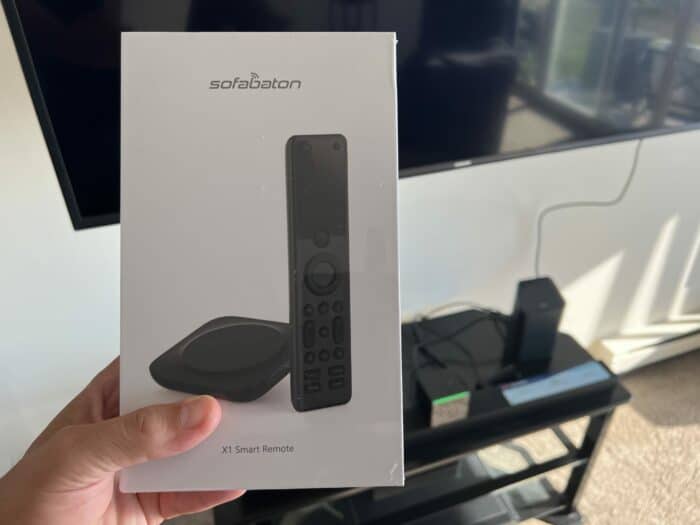
My Sofabaton X1 Universal Remote
SofaBaton X1S offers similar core functionality to the X2, minus the touchscreen, at a lower price.
#3 – Best Budget Universal: SofaBaton U3
Best Fit Choose U3 for a physical LCD remote without paying for a hub system.
The SofaBaton U3 is my pick if you want a modern alternative to an aging Harmony remote without stepping up to a hub-and-touchscreen system. It supports compatible IR and Bluetooth devices, can learn compatible 433/315 MHz RF commands, and can keep up to three compatible Bluetooth devices connected at once.
For the best Logitech Harmony alternatives, the U3 makes sense for simple setups with a television, soundbar, streamer, and other compatible equipment. Its one-touch macros can combine everyday steps such as powering on the TV, selecting the right input, and setting the soundbar volume. The rechargeable battery, USB-C charging, and 2.4-inch LCD make it a current direct-control option.
The tradeoff is that it is not a true Harmony Elite replacement for every home theater. The U3 has no Wi-Fi hub for broader smart-home control, and IR devices need line of sight unless you add the optional R1 repeater. It is best for readers who want a physical, button-first universal remote for compatible living-room gear.
Pros
- Supports compatible IR, Bluetooth/BLE, and learnable RF devices.
- One-touch macros simplify regular TV and audio routines.
- Rechargeable with USB-C charging and a 2.4-inch LCD.
- Optional R1 repeater can reach compatible hidden IR gear.
Cons
- No Wi-Fi hub or broad smart-home control.
- Device profiles and Bluetooth features need compatibility checks.
- Setup still takes patience in the SofaBaton app.
Rechargeable LCD universal remote, no hub required.
#4 – Best Voice Control: Fire TV Cube
Best Fit Choose Fire TV Cube when hands-free Alexa control matters more than one traditional remote.
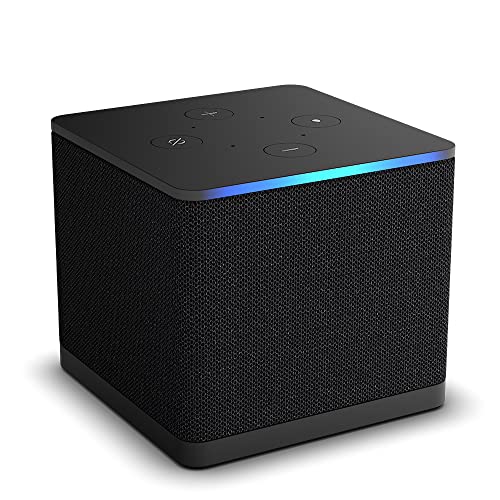
I love my new Fire TV Cube 3rd Gen and have used my other remotes far less since I bought this. Fire TV has become my go-to streaming service because of this device. I use it as my launchpad for Netflix, YouTube, Disney+, HBOMax, and Amazon Prime Video.
You can say: Alexa, Watch Mr. Beast on YouTube,” and she opens up YouTube to Mr. Beast’s channel. If I say, Alexa, Show me, Agents of Shield on Netflix, she will open to the last episode I left off on in my Netflix account.
Very cool.
You can also use many of the smart home features of Alexa using the Cube. For example, you can dim lights and lower blinds, get news and weather updates on the TV screen, and much more. It will be interesting to see if devices like this will ultimately replace physical remotes in the long term.
Not a substitute for a traditional remote, yet, but close….real close.
Video Review
Pros
- Completely control your home entertainment experience using Alexa.
- Adjust volume, access content, pause/rewind fast forward your favorite shows using your voice.
- Functions as an Echo smart speaker with limited commands (link to commands list below).
Cons
- Alexa only, does not work with Google Home or Siri.
- Requires its own HDMI cable – sold separately.
Hands-free 4K Fire TV box with Wi-Fi 6E and Ethernet.
#5 – Best Budget App & Hub: BroadLink RM4 Pro
Best Fit Choose BroadLink when app automation matters more than having a handheld remote.
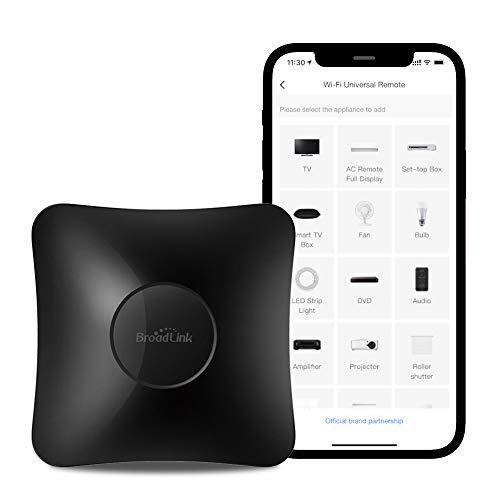
If you don’t mind navigating your home theater and smart home using an app instead of a physical remote, Broadlink is an inexpensive way. In effect, it gives you much of the same functionality as some of the most expensive remotes on my list at a fraction of the cost. You connect everything to the Hub and then use the app to navigate your devices. Alternatively, you can use your voice with Alexa or Google Home.
Broadlink even provides support for IFTTT (if this then that ) recipes allowing you to truly automate certain tasks, like turning on the lights at dusk, arming an alarm when you leave home, turning on an A/C unit when a room reaches a certain temperature or turning on the morning news shortly after you get out of bed. This is a bit tricky to set up for the less technical set but offers a lot of value for very little money.
Video Review
Pros
- Controls smart home and home theater devices.
- Supports both Amazon Alexa and Google Home for voice control.
- IFTTT support.
- Can create sophisticated routines to automate key functions.
Cons
- Limited support for RF chip sets (315 MHz or 433 MHz only) so check your devices before you buy.
- App can be a bit clunky.
- Customers report issues with Android Go compatibility.
- Learning curve, especially for those less technically inclined.
#6 – Budget Universal: Inteset 4-in-1
Best Fit Choose Inteset for inexpensive backlit IR control across a small entertainment stack.

The Inteset 4-in-1 universal remote is a great budget option on my list of Logitech Harmony alternatives if you want to control your entertainment experience primarily. It will only do IR, but it does it well. All of the buttons are backlit (LED), and you can use it to control your favorite streaming devices like Apple TV and Roku, and Nvidia Shield, as well as many other A/V devices.
It will not control your smart home, however. And there is no voice control support with Alexa or Google Assistant.
Worth knowing before you buy: Inteset no longer sells this remote on its own, only bundled with its IReTV infrared receiver, which helps if your streamer has no infrared sensor and is redundant if it does.
Pros
- Super affordable budget option
- Can program all buttons with a string of up to 15 custom commands
- Documentation is good (B+)
- Can “learn” from other remotes
- Includes self-adhesive labels for custom macro buttons
Cons
- Limited to control of four devices
- It may take a few tries to get it to “learn” existing remotes properly
- Flat buttons makes to hard to know what you are pressing
- Macros can be a bit difficult to learn
Lorem ipsum dolor sit amet, consectetur adipiscing elit. Morbi auctor suscipit magna pretium sodales. Vestibulum eu lorem vitae diam ullamcorper viverra in vitae nunc. Duis non risus urna.
#7 – Best for Gearheads: MX-990
Best Fit Choose MX-990 when a custom installer will program a serious IR/RF system.
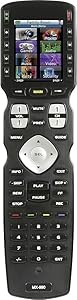
Next on my list of Logitech Harmony alternatives is this space-age looking remote from MX-990.
Since Logitech announced that it would cease manufacturing Harmony remotes, the MX-990 universal remote control has become one of the more popular Logitech Harmony alternatives. This is for a good reason. The MX-990 was designed to be the remote that can control all your electronics while looking sleek and modern in your living room. It has many features, including a large color LCD screen that lets you control your entertainment experience.
The MX-990 also boasts compatibility with over 220,000 devices from 5,000 brands and six unique programmable buttons, making switching between modes easy. The remote feels solid in hand, and the button layout is probably the best among all the remotes I have tested, including Harmony. The only drawback to this remote is that it requires a technical versed in the MX-990’S proprietary software to program the remote for your devices. This is not a DIY option, which is unclear from Amazon’s sales page.
Pros
- People who own this remote love it.
- Wakes up when motion is detected, saving battery life.
- Excellent button layout, functionality, and usability.
- Feels solid in the hand.
- Customizable home screen for all your key activities.
Cons
- Requires a URC-certified tech installer to get it to work.
- Fees for a custom installer run around $100, plus you will need to hire them to make any changes.
#8 – Best for Apple TV: Function101
Best Fit Choose Function101 when Apple TV needs familiar buttons without touch gestures.

I recently had the opportunity to test the Function101 remote, designed specifically for Apple TV users, and review it for this blog. The Function101 remote offers a more traditional design with a straightforward button layout that many users may find familiar and easy to use.
The remote features a highly responsive directional pad, making menu navigation a breeze. Additionally, the Function101 remote is equipped with dedicated media control buttons, allowing quick access to essential functions like play, pause, and volume control.
Designed to work seamlessly with Apple TV, the Function101 remote offers a reliable alternative to the standard Siri Remote. It provides a more user-friendly experience, making it an excellent choice for those seeking an intuitive and straightforward remote control for their Apple TV.
Pros
- Traditional design with an easy-to-use button layout
- Responsive directional pad for smooth menu navigation
- Dedicated media control buttons for quick access
Cons
- Lacks voice control features
- No touchpad functionality
- Batteries not included
Function101 is offering my readers special savings on this remote. Click Function101 below for the deal, or shop at Amazon if you prefer.
#9 – Best for Fire TV: Alexa Voice Remote Pro
Best Fit Choose Alexa Remote Pro when Fire TV already runs the room and you want better buttons.

I recently bought and tested the Alexa Voice Remote Pro to compare it to the old Alexa voice remote and review it for this blog. The Pro remote outshines the old remote in three ways.
First, the remote finder feature has proven quite useful, as it emits an audible signal that helps locate a misplaced remote, saving time and frustration.
Second, the backlit buttons make using the remote in low light conditions more convenient, ensuring ease of use at any time of day. Third, the customizable numbered buttons and the dedicated headphone button for easy Bluetooth pairing have contributed to a more personalized control experience.
This versatile remote is designed for compatibility with various devices, helping to declutter my entertainment setup. Shared with the old remote, voice control capabilities offer a more effortless way to navigate through menus, making movie nights and binge-watching sessions enjoyable and easygoing.
Video Review
Pros
- Voice control for hands-free navigation
- Remote finder to locate misplaced remotes
- Backlit buttons for use in low light
- Two customizable buttons for personalized control
- Headphone button for easy Bluetooth pairing
Cons
- Slightly more expensive than the standard Alexa Voice Remote
- Requires AAA batteries, not included
- Limited compatibility with some Fire TV devices
Best Logitech Harmony Alternatives: Verdict
 The best Logitech Harmony alternatives split into premium hub systems, direct physical remotes, and app- or voice-first control.
- Best Overall: SofaBaton X2 if premium whole-room control.
- Best Value Hub: SofaBaton X1S if hub control below the X2 tier.
- Best Budget Universal: SofaBaton U3 if rechargeable LCD control without a Wi-Fi hub.
For most former Harmony owners, X2 is the closest premium fit; X1S and U3 are the more practical ways to spend less.

Please subscribe for a fun take on tech—tips, unboxings, reviews & more!