
As an Amazon Associate, I earn from qualifying purchases.
Here are the best remotes for Insignia TVs if you want better universal, replacement, or Fire TV control.
Bigger Than Best Buy
The remote situation is messier. Some Insignia TVs are basic smart TVs. Some are Fire TV Edition sets. Some people only need a cheap replacement, while others want one remote to run the TV, streamer, soundbar, and maybe the lights too.
I own or have tested all of the options in this roundup, including the SofaBaton X2, SofaBaton U3, Fire TV Cube, and SofaBaton X1S. The trick is matching the remote to your exact setup..
Polaris Market Research is still tracking demand for universal remote controls, and that lines up with what I see in real rooms. The best remotes for Insignia TVs should either simplify the whole setup or solve the lost-remote problem cleanly.
Key Takeaways
- SofaBaton X2 is the premium choice for an Insignia TV connected to several devices.
- Insignia Voice Remote and Insignia NS-RC03A-13 are the two direct Insignia recommendations for Fire TV and older OEM replacement needs.
- SofaBaton U3 and Function101 Bluetooth Remote cover rechargeable universal control and a button-first Apple TV setup.
Best Remotes for Insignia TVs Comparison Table
The following table compares my five best remotes for Insignia TVs side by side.
| Premium Hub | Alexa Control | Value Hub | Best Budget Universal | Best Insignia Fire TV | |
|---|---|---|---|---|---|
| Product Image |

|

|

|

|
|
| Model | SofaBaton X2 | Fire TV Cube | SofaBaton X1S | SofaBaton U3 | Insignia Voice Remote |
| Rank | 1 | 2 | 3 | 4 | 5 |
| Best Fit | Best fitChoose X2 for an Insignia TV with hidden or connected gear. | Best fitChoose Fire TV Cube for hands-free Alexa and built-in streaming. | Best fitChoose X1S for hub-based Activities without the X2 touchscreen. | Best fitChoose U3 for rechargeable controls without adding a separate hub. | Best fitChoose this after confirming compatibility with your Insignia Fire TV. |
| Backlit Buttons | |||||
| Control Style | Touchscreen remote plus hub | Streamer plus voice control | OLED remote plus hub | Button remote with LCD | OEM-style Fire TV remote |
| App Setup | |||||
| Voice Control | Alexa, Google, Home Assistant | Hands-free Alexa | Alexa and Google Assistant | Compatible Bluetooth devices | Alexa voice button |
| Multi-Device Control | |||||
| Power | Rechargeable with charging dock | Plug-in cube; remote batteries | USB-C rechargeable | 1200mAh USB-C rechargeable | Replaceable batteries |
| Check Price | Check Price | Check Price | Check Price | Check Price | Check Price |
SofaBaton X2
Fire TV Cube
SofaBaton X1S
SofaBaton U3
Insignia Voice Remote
#1 – SofaBaton X2: Premium Hub
Best Fit
Choose X2 for an Insignia TV with hidden or connected gear.
I have tested the SofaBaton X2, and it is the strongest premium pick here for an Insignia setup that has grown beyond one TV. The touchscreen remote and hub can coordinate the television, streamer, soundbar, receiver, and compatible smart devices through Activities.
The X2 costs more and takes longer to configure than a basic replacement. It earns that premium when you regularly switch inputs and want the right controls ready for each activity.
Pros
- Touchscreen makes Activities easy to find
- Hub reaches equipment inside closed cabinets
- Coordinates complex entertainment systems well
- Charging dock keeps the remote ready
- Voice assistant support adds flexibility
Cons
- Premium price fits complex setups best
- Initial setup takes real patience
- Overkill for a TV-only bedroom
#2 – Fire TV Cube: Alexa Control
Best Fit
Choose Fire TV Cube for hands-free Alexa and built-in streaming.
I use the Fire TV Cube in my own living room, and hands-free Alexa is the reason it stays high on this list. It can launch apps, search for shows, adjust volume, and control compatible TV and audio gear without making you hunt for the remote.
It is best for an Insignia Fire TV setup or a household already committed to Alexa. It is a streamer first, so buyers who prefer broad button-based device control should look at SofaBaton instead.
Pros
- Hands-free Alexa works across the room
- It doubles as a capable streamer
- Controls compatible TV and audio gear
- Physical remote stays available
- Fire TV navigation remains familiar
Cons
- The Fire TV ecosystem comes first
- Not a conventional universal remote
- Compatibility varies by connected device
#3 – SofaBaton X1S: Value Hub
Best Fit
Choose X1S for hub-based Activities without the X2 touchscreen.
I have tested the SofaBaton X1S, and it remains a practical hub remote for an Insignia system with several devices. Activities can turn on the TV, select the right input, wake a streamer, and leave soundbar controls ready.
The X1S gives up the X2 touchscreen, but it also costs less. The OLED screen and physical buttons are a good middle ground when you want hub control without buying the top model.
Pros
- Activities simplify daily input switching
- Hub reaches hidden entertainment gear
- OLED screen keeps devices organized
- USB-C charging avoids disposable batteries
- Voice assistants add useful flexibility
Cons
- Setup still requires careful tuning
- OLED is smaller than X2 touchscreen
- May be too much for a simple TV setup
#4 – SofaBaton U3: Best Budget Universal
Best Fit
Choose U3 for rechargeable controls without adding a separate hub.
I have tested the SofaBaton U3, and its 2.4-inch wake-on-lift LCD, backlit controls, rechargeable battery, and USB-C charging make it the better button-first universal pick for this Insignia roundup.
The U3 controls compatible infrared and Bluetooth devices plus learnable 433/315 MHz RF gear. It supports macros and up to three active Bluetooth devices, while Google voice and Air Mouse depend on the connected device.
Pros
- LCD keeps devices and modes visible
- USB-C charging replaces disposable batteries
- Backlit controls work well at night
- IR Bluetooth and RF broaden compatibility
- Macros combine common viewing commands
Cons
- No Wi-Fi or Harmony-style hub
- Voice support depends on the device
- Hidden gear may need the R1 repeater
#5 – Insignia Voice Remote: Best for Fire TV
Best Fit
Choose this after confirming compatibility with your Insignia Fire TV.
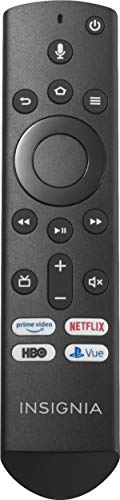
The Insignia Voice Remote is my first Insignia-branded recommendation when a compatible Fire TV Edition set has lost its original remote. It restores familiar navigation, playback buttons, and Alexa voice control without adding a separate hub.
Compatibility and pairing matter more than feature count here. Check the exact TV model before ordering, then follow the Fire TV pairing steps if the remote does not connect immediately.
Pros
- Familiar Fire TV controls return quickly
- Alexa voice button is built in
- No separate hub is required
- Streaming shortcuts are easy to reach
- Simple layout works well for guests
Cons
- It controls fewer connected devices
- Pairing may take another attempt
- Exact model compatibility still matters
#6 – Function101: Best for Apple TV
Best Fit
Choose Function101 when Apple TV needs a traditional button layout.

I have tested the Function101 Bluetooth Remote with Apple TV, and the traditional directional pad is much easier to hand to guests than a touch-heavy remote. It gives this Insignia roundup a focused Apple TV option instead of a general-purpose hub.
The Bluetooth edition works with Apple TV 4K and Apple TV HD while infrared handles compatible TV controls. It does not include a Siri voice button, so keep the Siri Remote nearby if voice search matters.
Pros
- Traditional Apple TV buttons feel familiar
- Bluetooth handles current Apple TV models
- Directional pad simplifies daily navigation
- Guests understand the layout quickly
- Infrared supports compatible television controls
Cons
- There is no Siri voice button
- It focuses mainly on Apple TV
- It cannot replace a multi-device hub
Function101 is offering my readers special savings on this remote. Click Function101 below for the deal, or shop at Amazon if you prefer.
#7 – Insignia NS-RC03A-13: Best OEM Replacement
Best Fit
Choose this only after matching the exact Insignia TV model.
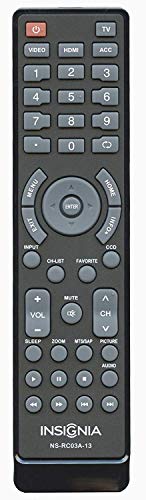
The Insignia NS-RC03A-13 is my second direct Insignia recommendation. It is the practical option for a compatible older television that only needs familiar TV controls restored.
This is not a broad universal remote, and the model-number match is everything. Check the label on the TV before ordering so the replacement maps the expected power, input, volume, and navigation buttons.
Pros
- Familiar Insignia layout is easy
- Basic TV controls work without extras
- No hub or app is required
- Useful replacement for matched models
- Simple design suits guest rooms
Cons
- The compatible model list is narrow
- No modern streaming shortcut buttons
- Buying the wrong version is easy
How to Choose
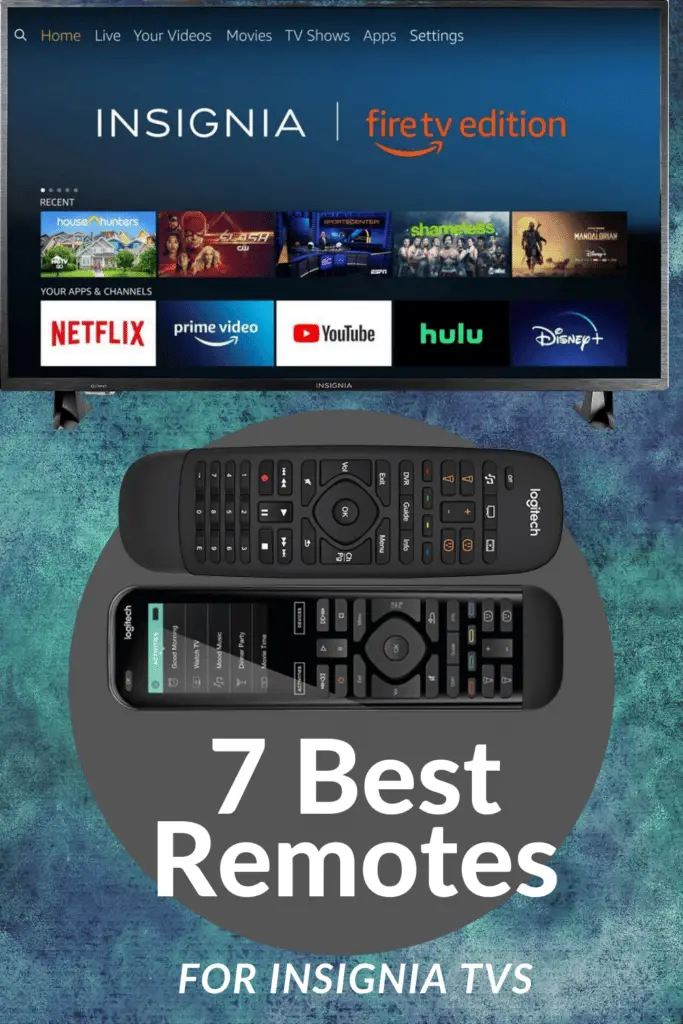
Still deciding which of the best remotes for Insignia TVs fits your setup? Here is the short version of what I check before picking a remote, plus a Pinterest pin you can save for later.
What Actually Matters
After comparing the Insignia options against the field, these are the buying details I would check before ordering.
- Match the platform first. Insignia Fire TV buyers should start with Fire TV-compatible options before considering a generic replacement.
- Count the connected devices. Add a hub remote only when the TV also works with a streamer, soundbar, receiver, or smart-home gear.
- Respect the daily user. A simple handheld remote can beat an app-heavy system for bedrooms, guests, and family rooms.
- Check the model number twice. Replacement remotes are unforgiving, so match the model number before trusting the product title.
- Pay for useful capability. Spend more on X2 or Fire TV Cube only when their extra controls solve a real daily problem.
FAQs
These are the quick answers I would check before buying a remote for an Insignia TV.
1. What are the best remotes for Insignia TVs with Fire TV?
Start with an official Insignia voice remote when you only need the original TV experience back. Choose Fire TV Cube when Alexa voice control, streaming, and smart-home commands matter more. A hub remote can still make sense when the same room also has a receiver, soundbar, disc player, or external streaming box installed at home.
2. Can I use a universal remote with an Insignia TV?
Yes. The best remotes for Insignia TVs can control many models through infrared codes, Bluetooth, or a hub, depending on the TV and remote. Check compatibility before buying, especially with Fire TV Edition sets. Simple replacements solve lost clickers, while hub remotes help when the TV shares a room with other devices nightly too now.
3. Is SofaBaton good for Insignia TVs?
SofaBaton is useful when an Insignia TV shares the room with several devices. The X2 and X1S are hub remotes, while U3 adds an LCD, USB-C charging, and control for compatible infrared, Bluetooth, and learnable RF gear without a Wi-Fi hub. Choose by the devices in the room.
4. Do Insignia replacement remotes need pairing?
Some Insignia replacements work immediately after batteries are installed, while Fire TV voice remotes usually need pairing. The exact process depends on the TV model and remote type. The best remotes for Insignia TVs are easier to choose when you match the model number first, then decide between infrared, Bluetooth, or hub control first safely.
5. Should I buy a replacement or universal remote?
Buy a replacement if your Insignia TV is the only device you need to control. Buy a universal remote when you also use a soundbar, receiver, streaming box, cable box, or smart-home gear. The best remotes for Insignia TVs are the ones that match the room, not just the logo on screen today, honestly enough.
Best Remotes for Insignia TVs Verdict
The best remotes for Insignia TVs depend on whether you need a direct replacement or broader control for connected gear. I would choose by compatibility first, then by price.
- Choose SofaBaton X2, SofaBaton X1S, or SofaBaton U3 when the television must also work with a streamer, soundbar, or receiver.
- Choose Fire TV Cube or the Insignia Voice Remote when Fire TV is your primary platform.
- Choose Function101 Bluetooth Remote for Apple TV, or Insignia NS-RC03A-13 for a matched OEM-style replacement.
For another brand-specific roundup, my TCL remote guide is the next one I would compare before buying.

Please subscribe for a fun take on tech—tips, unboxings, reviews & more!