As an Amazon Associate, I earn from qualifying purchases.
Sony’s Real Remote Problem
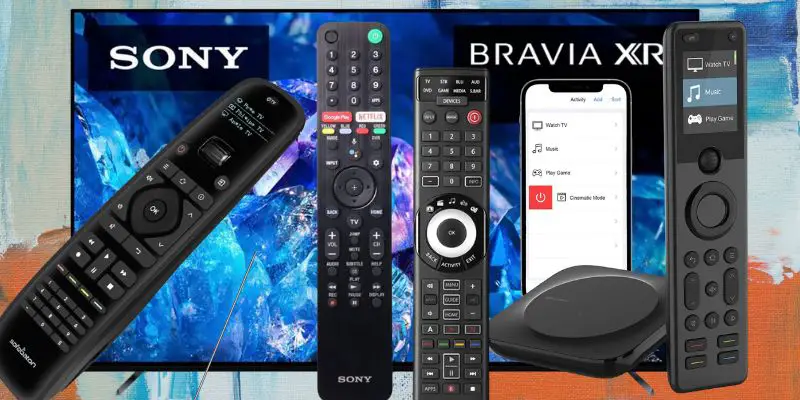
 My Sony TV delivers the picture quality I wanted, but the stock remote never kept pace once a soundbar and streamer joined the room.
A broken factory clicker needs a simple replacement. A growing entertainment center needs one controller that can handle the TV, audio, and streaming gear without turning the coffee table into a pile of remotes.
That is why I ranked the best Sony smart TV remotes by who they actually serve, from direct Sony replacements to full-room universal options. Grand View Research shows the smart TV market keeps growing as living rooms add more connected gear.
Key Takeaways
- SofaBaton X2 is the premium whole-room pick for a Sony TV, soundbar, streamer, and smart-home gear.
- SofaBaton U3 is the modern LCD-screen upgrade from the U2, adding rechargeable multi-device control and more advanced features without an X-series hub.
- Sony replacements fit narrower model-specific needs, so buyers should verify their exact TV before ordering.
Best Sony Smart TV Remotes Comparison Table
The following table compares the top five best Sony smart TV remotes side by side.
| Editor’s Choice | Premium Hub | LCD Universal Upgrade | Pre-Programmed | Sony Replacement | |
|---|---|---|---|---|---|

|

|

|

|

|
|
| Product | SofaBaton X2 | SofaBaton X1S | SofaBaton U3 | One for All | Coolux Universal |
| Rank | #1 | #2 | #3 | #4 | #5 |
| Role | Whole-room touchscreen hub | Premium OLED hub | LCD universal upgrade | Pre-programmed universal | Sony-style replacement |
| Best Fit | Premium whole-room consolidation | Hub control without a touchscreen | Modern screen-equipped upgrade from U2 | Simple multi-device replacement | Direct Sony-style replacement |
| Control Type | IR + Bluetooth + RF + Wi-Fi | IR + Bluetooth + Wi-Fi | IR + Bluetooth + RF | Pre-programmed IR | Sony-compatible IR |
| Screen / Navigation | Color touchscreen | OLED screen | 2.4-inch wake-on-lift LCD | No screen | No screen |
| Power | Rechargeable with dock | Rechargeable | 1200mAh rechargeable; USB-C | AA batteries | AAA batteries |
| Check Price | Check Price | Check Price | Check Price | Check Price |
- Rank
- #1
- Role
- Whole-room touchscreen hub
- Best fit
- Premium whole-room consolidation
- Control
- IR + Bluetooth + RF + Wi-Fi
- Screen
- Color touchscreen
- Power
- Rechargeable with dock
- Rank
- #2
- Role
- Premium OLED hub
- Best fit
- Hub control without a touchscreen
- Control
- IR + Bluetooth + Wi-Fi
- Screen
- OLED screen
- Power
- Rechargeable
- Rank
- #3
- Role
- LCD universal upgrade
- Best fit
- Modern screen-equipped upgrade from U2
- Control
- IR + Bluetooth + RF
- Screen
- 2.4-inch wake-on-lift LCD
- Power
- 1200mAh rechargeable; USB-C
- Rank
- #4
- Role
- Pre-programmed universal
- Best fit
- Simple multi-device replacement
- Control
- Pre-programmed IR
- Screen
- No screen
- Power
- AA batteries
- Rank
- #5
- Role
- Sony-style replacement
- Best fit
- Direct Sony-style replacement
- Control
- Sony-compatible IR
- Screen
- No screen
- Power
- AAA batteries
#1 – SofaBaton X2: Editor’s Choice
At a Glance
- Compatibility: Works with all current Sony Smart TVs through the SofaBaton hub.
- Power: Rechargeable lithium battery with charging dock.
- Voice / Smart Home: Alexa, Google Assistant, and Home Assistant.
- Screen: Color touchscreen for activities and device control.
- Best For: A full living room with TV, soundbar, streamer, and smart-home gear consolidated to one remote.
I have been using the SofaBaton X2 since launch and it is the remote I now reach for first when I sit down on the couch. It pairs to my Sony Smart TV over the SofaBaton hub, runs the soundbar and Apple TV in the same activity, and the color touchscreen turns the multi-device problem into a single tap. The X2 is the most capable Sony-compatible hub remote I have tested.
For Sony owners specifically, the X2 covers IR, Bluetooth, RF, and Wi-Fi targets, which means it speaks to the TV, the AV receiver, the streaming stick, and the smart-home stack from the same device. The rechargeable dock and Home Assistant support tip the value over the older hub-only options on this list. It earns the Editor’s Choice slot among the best Sony smart TV remotes.
Pros
- Color touchscreen consolidates activities into a single tap.
- IR, Bluetooth, RF, and Wi-Fi from one remote and hub.
- Rechargeable battery with charging dock.
- Alexa, Google Assistant, and Home Assistant support.
- Backlit hard buttons for nighttime use.
Cons
- Highest-cost pick on this list.
- Initial app setup takes patience for first-time hub users.
- Touchscreen learning curve compared to a hard-button remote.
Touchscreen hub remote for a full home-theater setup.
Video Review
I opened up the SofaBaton X2 over on @TecTimmy.
#2 – SofaBaton X1S: Premium Hub
At a Glance
- Compatibility: Works with all current Sony Smart TVs through the SofaBaton hub.
- Power: Rechargeable battery with long cycle life.
- Voice / Smart Home: Alexa and Google Assistant.
- Screen: Small monochrome OLED for activity menus.
- Best For: Hub control without paying for a touchscreen.
I owned and tested the SofaBaton X1S for over a year before the X2 launched, and it remains the best non-touchscreen hub on the Sony shortlist. The X1S ships with a streamlined hard-button layout and a small OLED that handles device and activity menus. It pairs cleanly with Sony Smart TVs over the hub and runs the rest of the entertainment center alongside it.
If touchscreens are not your thing, the X1S is the right call. It hits most of the same targets as the X2, including IR, Bluetooth, and Wi-Fi devices, voice assistants, and one-touch activities, without the screen learning curve. Among the best Sony smart TV remotes, it is the one I recommend for buyers who want hub power in a familiar clicker form factor.
Pros
- Streamlined hard-button layout with backlight.
- OLED display for device and activity selection.
- Hub controls IR, Bluetooth, and Wi-Fi devices.
- Alexa and Google Assistant integration.
- Rechargeable battery with long cycle life.
Cons
- No touchscreen for richer activity menus.
- Older lineup compared to the X2 flagship.
- App setup still takes a first-run investment.
SofaBaton X1S offers similar core functionality to the X2, minus the touchscreen, at a lower price.
#3 – LCD Universal Upgrade: SofaBaton U3
At a Glance
- Compatibility: Compatible Sony TVs and nearby IR, Bluetooth, and RF gear; verify the exact model.
- Power: 1200mAh rechargeable battery with USB-C charging.
- Voice / Smart Home: Google voice on compatible Bluetooth devices; no Wi-Fi hub.
- Screen: 2.4-inch LCD with wake-on-lift.
- Best For: A modern LCD-screen upgrade from the U2 without an X-series hub.
Overview
SofaBaton U3 is the modern LCD-screen upgrade in the old U2 slot. The 2.4-inch wake-on-lift display, rechargeable battery, USB-C charging, macros, Air Mouse, and supported Google voice make it a much more capable remote than the older U2 without forcing you into an X-series hub.
It combines IR, supported BLE/BT devices, learnable 433/315 MHz RF commands, one-touch macros, a 2.4-inch LCD, and USB-C charging. Sony compatibility still depends on the exact model and control path, and Google voice or Air Mouse works only when the paired Bluetooth device natively supports it.
Pros
- Controls compatible IR, Bluetooth, and learnable RF gear.
- Keeps up to three supported BLE devices connected.
- One-touch macros simplify TV, input, and audio routines.
- Rechargeable USB-C battery and 2.4-inch LCD.
Cons
- No Wi-Fi or smart-home hub.
- Exact Sony compatibility varies by model.
- Voice and Air Mouse require a compatible Bluetooth device.
- The original Sony remote may still be needed for proprietary features.
#4 – One for All: Eight-Device Pre-Programmed
At a Glance
- Compatibility: Pre-programmed for major Sony Smart TV models.
- Power: AA batteries.
- Voice / Smart Home: None.
- Screen: None.
- Best For: Replacing a few standard remotes without an app or hub.
The One for All universal is the no-frills replacement option. It ships pre-programmed for the major brands, so a Sony Smart TV, a soundbar, and a cable box are usually paired within minutes of unboxing the package. There is no app, no hub, and no learning curve.
This is the right pick for a parent who wants to consolidate three or four clickers into one without setting up a smartphone, or for a guest room where simplicity matters more than features. It will not run a smart-home stack, but for the basics, it is one of the best Sony smart TV remotes at the budget tier.
Pros
- Pre-programmed for major TV brands.
- Simple two-step pairing without an app.
- Familiar hard-button layout.
- Strong value for casual users.
Cons
- No voice control or smart-home support.
- No backlit buttons.
- Maxes out at eight devices.
#5 – Coolux Universal: Sony LCD/LED Replacement
At a Glance
- Compatibility: Designed for most Sony Smart TVs (LCD and LED).
- Power: AAA batteries.
- Voice / Smart Home: None.
- Screen: None.
- Best For: A drop-in OEM-style replacement when the factory remote is broken or lost.
The Coolux Universal is the closest thing to a like-for-like Sony OEM remote without paying OEM prices. The button layout mirrors the factory clicker, the IR profiles cover most Sony Smart TVs (LCD and LED) on the market, and there is no setup beyond dropping in two AAA batteries.
For a household that just wants the original remote back, this is the cleanest swap among the best Sony smart TV remotes. It does not consolidate devices and it does not run voice assistants, but if the goal is “make the TV work again,” it gets the job done at a fraction of OEM cost.
Pros
- Drop-in replacement for most Sony Smart TVs.
- Familiar OEM-style button layout.
- No setup or pairing required.
- Lower cost than a Sony factory remote.
Cons
- No universal multi-device support.
- No backlit buttons.
- AAA batteries are not rechargeable.
#6 – Xiaodib RMF-TX800U: Sony Voice Replacement

At a Glance
- Compatibility: Newer Sony 4K and 8K Smart TVs (KD and XR series).
- Power: AAA batteries.
- Voice / Smart Home: Google Assistant voice button.
- Screen: None.
- Best For: A factory-spec voice replacement for newer Sony Smart TV owners.
The Xiaodib RMF-TX800U is the best lookalike for the Sony voice remote that ships with current 4K and 8K Smart TVs. It carries the four shortcut buttons, the Google Assistant key, and the layout Sony owners already know, with a sensitive ABS keypad that holds up to daily use. Pairing is the same long-press combination as the factory remote.
This is the slot for owners of newer Sony KD and XR series Smart TVs who want voice control back without paying genuine OEM prices. It is not a universal remote. For a like-for-like factory replacement with voice intact, it still earns a spot among the best Sony smart TV remotes.
Pros
- Voice key with Google Assistant pairing.
- Four shortcut buttons match factory layout.
- Wide compatibility across Sony KD and XR series.
- Lower cost than genuine OEM.
Cons
- Not a universal multi-device remote.
- Older Sony models outside the supported list will not pair.
- AAA batteries instead of rechargeable.
#7 – Sony RM-YD092: Cheapest Sony Replacement

At a Glance
- Compatibility: Most older Sony Smart TVs (LCD and LED).
- Power: AAA batteries.
- Voice / Smart Home: None.
- Screen: None.
- Best For: The cheapest plug-and-play swap for an older Sony set.
The Sony RM-YD092 is the budget end of the list. The button layout matches the Sony factory remote, it ships in the OEM-style shell, and it works out of the box on most older Sony Smart TVs without programming. Drop in two AAA batteries and the TV is responding within seconds.
This is the right call when the original remote is gone and the priority is getting the TV functional again at the lowest price. It will not control a soundbar or a streamer, but for a single Sony Smart TV, it is the cheapest working option among the best Sony smart TV remotes.
Pros
- True OEM-style layout and shell.
- No programming or app required.
- Works with most older Sony Smart TVs.
- Lowest cost on this list.
Cons
- Single-device control only.
- No voice or smart-home features.
- Older models may need verification by serial.
Quick Buying Guide

Here are some key questions to consider when shopping the best Sony smart TV remotes for your living room:
FAQs
Here are the most common questions I have heard about the best Sony smart TV remotes, based on extensive testing for this site.
1. Which remote handles a multi-device Sony living room best?
A hub-based universal handles a multi-device room better than a single-purpose clicker. The SofaBaton X2 and X1S top the list of the best Sony smart TV remotes because they consolidate the TV, soundbar, and streamer into one remote, automate multi-step activities through the hub, and respond to voice assistants. Single-purpose replacements control only the TV.
2. Will the best Sony smart TV remotes work with every Sony model?
Compatibility varies by remote class. Hub remotes like the SofaBaton X2 and X1S cover virtually every current Sony Smart TV through both IR and Bluetooth profiles. OEM-style replacements like the RM-YD092 fit older Sony LCD and LED sets, while the Xiaodib RMF-TX800U targets newer KD and XR series with the Google Assistant. Verify before ordering.
3. Do these remotes also control my soundbar and streaming stick?
Universal remotes like the SofaBaton X2, X1S, and U3 can control compatible TVs, soundbars, AV receivers, streaming devices, and other home-theater gear. The U3 uses direct IR, supported Bluetooth, and learnable RF rather than a Wi-Fi hub, so verify each device profile before treating it as a full-room replacement.
4. Which Sony remote keeps voice control intact?
The Xiaodib RMF-TX800U keeps the Google Assistant voice key for newer Sony Smart TV owners, which makes it the standout among the best Sony smart TV remotes for late-night content discovery. Hub remotes like the SofaBaton X2 and X1S also support Alexa and Google Assistant, but route voice through the hub rather than the TV.
5. Is there a budget option that still feels like a real upgrade?
The SofaBaton U3 is the modern LCD-screen upgrade in the old U2 slot. It adds a 2.4-inch wake-on-lift display, a rechargeable battery, IR, supported Bluetooth, RF learning, macros, Air Mouse, and supported Google voice without the cost of an X-series hub. Buyers should still verify their exact Sony model and keep the original remote for proprietary features the U3 may not reproduce.
Best Sony Smart TV Remotes: Verdict
Choosing one of the best Sony smart TV remotes comes down to whether the goal is consolidation or replacement. The choice falls into three clear lanes.
- Choose the SofaBaton X2 if you want one premium remote running a Sony Smart TV, soundbar, streamer, and smart-home gear from a single touchscreen.
- Choose the Xiaodib RMF-TX800U if you want a factory-spec voice replacement that keeps Google Assistant on a familiar Sony layout.
- Choose the SofaBaton U3 if you want the modern LCD-screen upgrade from the U2, with rechargeable multi-device control and more advanced features but no X-series hub.
Whichever direction you go, the right answer depends on how many devices you actually want one remote to handle. If a phone is in your hand more than a clicker, my guide to the best remote apps for Sony TVs covers the smartphone-side options.

Please subscribe for a fun take on tech—tips, unboxings, reviews & more!